Telemedicine & Digital Health Portal
A compassionate, patient-first telehealth clinic website with doctor directory, specialty filters, and instant video consultation booking.
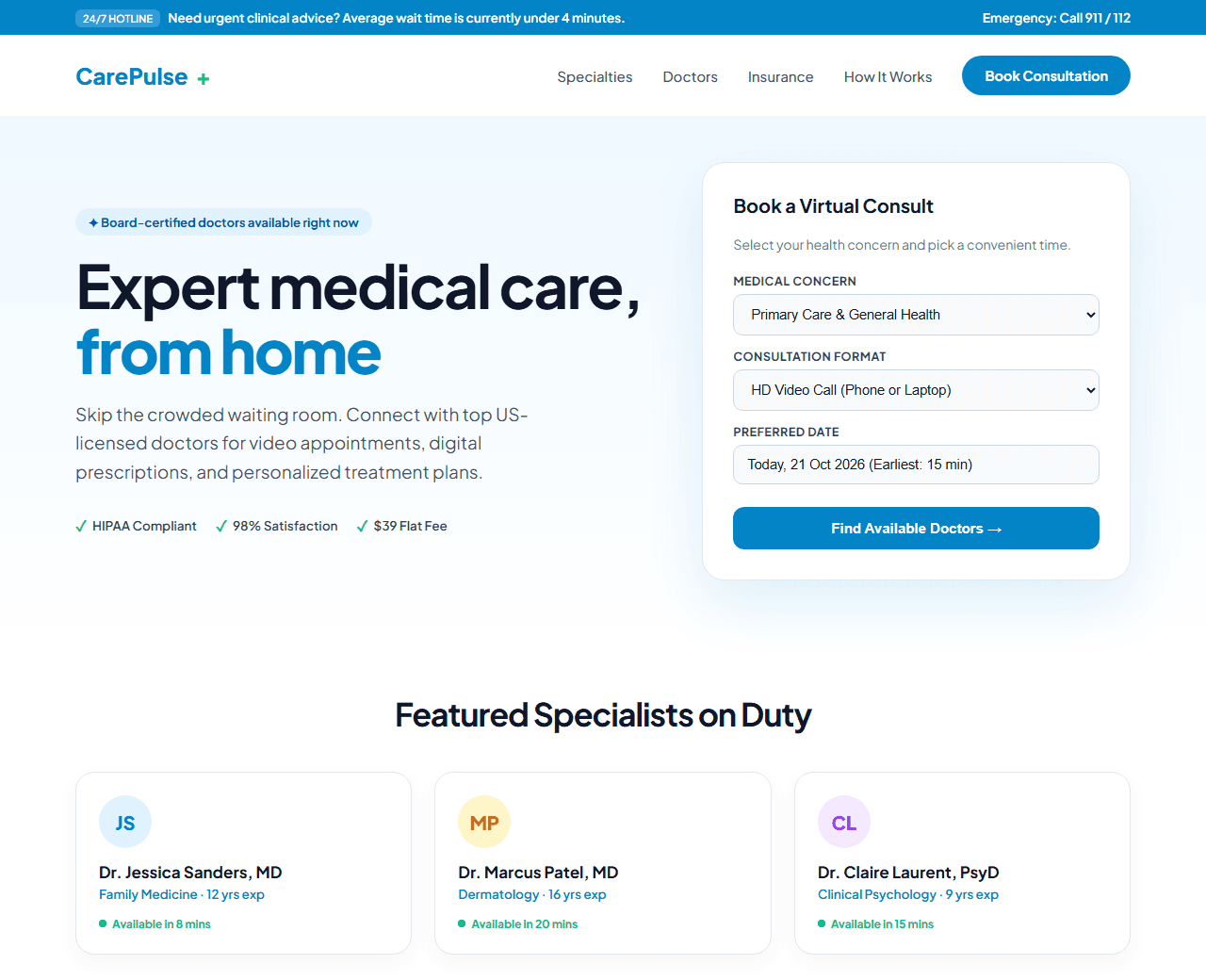
Example of the website this prompt builds. Your result will use your own name, text and images.
- Tech stack
- Next.js (App Router) + Tailwind CSS
- Colour palette
#ffffff#0f172a#0284c7#10b981
- What it builds
- Top announcement bar (24/7 Virtual Doctor Hotline)
- Sticky navbar with Emergency Alert button
- Hero with quick appointment booking widget
- Medical specialty selector (Primary Care, Dermatology, Mental Health)
- Board-certified doctor cards with rating & availability
- How virtual consultations work (3 steps)
- Patient testimonials & HIPAA security badge
- Insurance & flat-fee pricing breakdown
- Health advisory FAQ accordion
- Footer with medical disclaimer
The prompt
Copy everything in the box. Text in quotes and the sample business details are meant to be replaced with your own.
Build a modern, trustworthy telemedicine and virtual clinic landing page called "CarePulse Health".

Tech stack: Next.js (App Router) with Tailwind CSS. Clean component structure.

Visual style: welcoming and clinical. Crisp white background (#ffffff), deep navy text (#0f172a), sky blue (#0284c7) for primary actions, emerald green (#10b981) for online doctor availability indicators. Generous line-height, rounded 16px cards, and high contrast for accessibility.

Sections, in order:
1. Top Urgent Bar: "Need care right now? Average doctor connection time: 4 minutes" with direct call link.
2. Navbar: logo with medical cross mark, navigation links ("Find a Doctor", "Specialties", "How It Works", "Insurance", "Pricing"), and a "Book Consultation" button.
3. Hero: split layout. Left side: headline "Expert medical care from the comfort of your home", paragraph about board-certified physicians available 24/7 for prescriptions and advice. Right side: an instant booking card with dropdown for specialty, date picker, consultation type (Video vs Chat), and "Check Available Doctors" button.
4. Trust Badges: verified HIPAA compliant, 4.9/5 patient rating from 15,000+ consults, accredited physicians.
5. Specialties Grid: 6 circular cards with icons for General Medicine, Dermatology, Pediatrics, Mental Health, Cardiology, and Women's Health.
6. Doctor Roster: 3 featured physician cards showing doctor photo placeholder, full name, board certifications, star rating, consultation fee, and an "Available in 10 mins" green badge.
7. How It Works: 3 clean steps: 1) Choose doctor & time, 2) Join HD video call from any phone or laptop, 3) Receive digital prescription sent to your local pharmacy.
8. Insurance & Pricing: clear explanation of $39 flat-rate visits without insurance, plus list of accepted major insurance networks.
9. Patient Reviews: 3 verified patient stories with name and location.
10. Medical FAQ: 5 common questions about prescription renewals, emergency protocols, and privacy.
11. Footer: hospital disclaimers, privacy policy, state licensing statements, and copyright.

Quality bar:
- Fully responsive: design mobile-first, then tablet (768px) and desktop (1200px).
- Accessible: semantic HTML landmarks, one h1, alt text on images, visible keyboard focus, colour contrast of at least 4.5:1 for body text.
- Fast: no heavy libraries, lazy-load images below the fold, system or two web fonts at most.
- Use placeholder images from a neutral source and realistic sample copy (no lorem ipsum).
- Respect prefers-reduced-motion for every animation.
- Keep the code clean and commented so I can edit it by hand.
How to use this prompt
- 1
Open an AI coding tool. Use any capable assistant: Claude, ChatGPT, Cursor, v0, Bolt, Gemini. Tools that can create files (Cursor, Claude Code, v0, Bolt) are the most convenient because they write the project for you.
- 2
Replace the sample details. Copy the prompt and change the business name, location, colours and any section you do not need. The more specific your details, the better the result.
- 3
Paste the prompt and generate. Send the whole prompt in one message. If the reply is cut off, say “continue from where you stopped”, or ask for one section at a time.
- 4
Run it on your computer. Create a project with “npx create-next-app@latest”, add the generated files, then run “npm run dev” and open http://localhost:3000.
- 5
Review and refine. Check it on a phone-width screen, fix anything that looks off by describing it in plain words, then use the follow-up prompts below to add features one at a time.
- 6
Replace placeholders and publish. Swap in your real text and images, then deploy. Vercel and Netlify both host this kind of site for free.
Follow-up prompts
Send these one at a time after the first version is working. Small, specific requests give much better results than one giant prompt.
Add an interactive symptom-checker modal that suggests the appropriate medical specialty.
Add calendar booking slots selection with morning, afternoon, and evening availability.
Integrate WhatsApp appointment confirmation button.
Add Schema.org MedicalClinic and Physician structured data.
Tips for a better result
- Always include prominent disclaimers that emergency conditions require dialing 911 / 112 immediately.
- Keep doctor profile information transparent with credentials and degrees visible.
- Want to hand-build a section instead? The Templates library has heroes, pricing tables, FAQs and more with full code.