Corporate Law Firm & Legal Advisory
A distinguished corporate law firm and litigation practice website with confidential case evaluation forms and verified settlement outcomes.
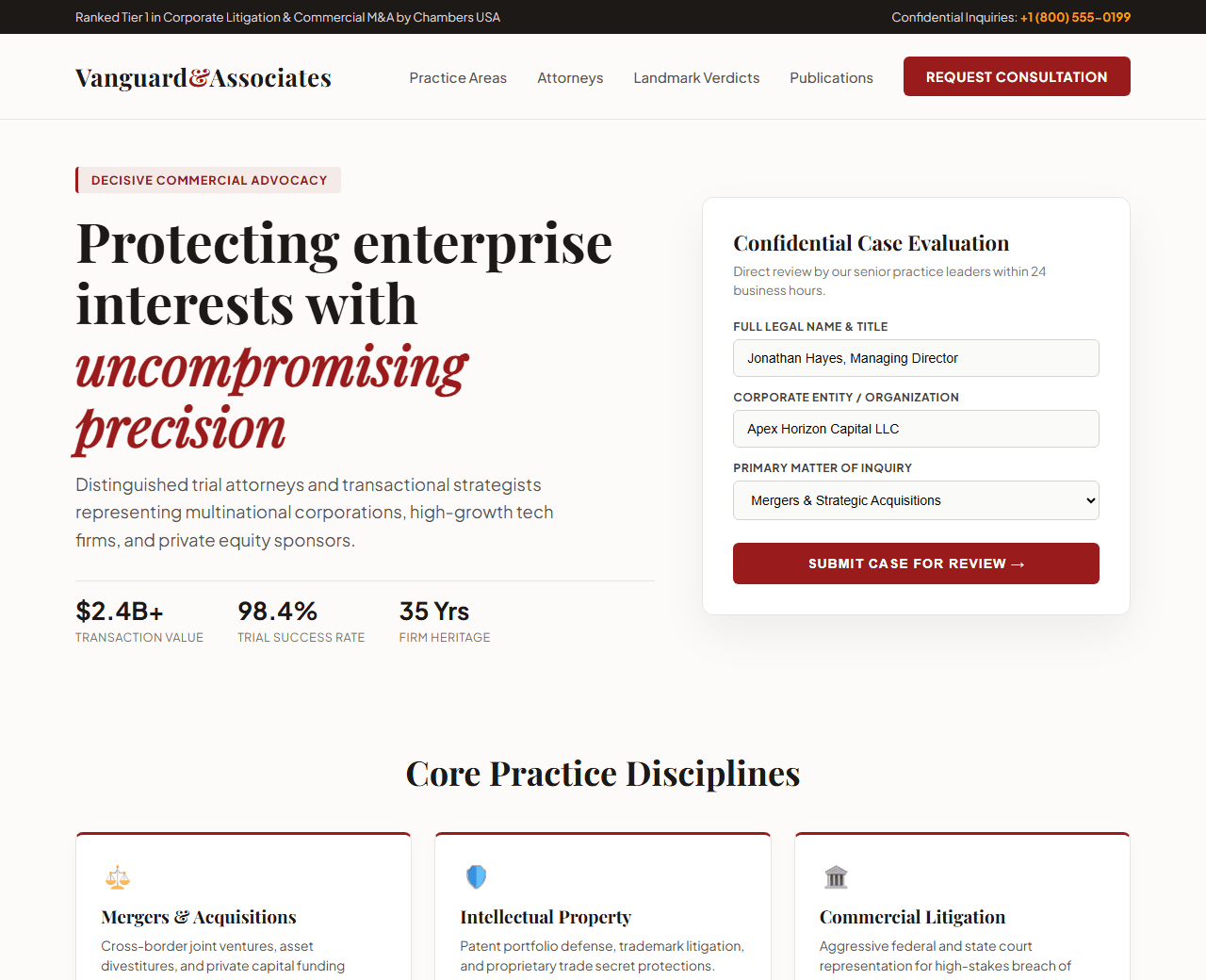
Example of the website this prompt builds. Your result will use your own name, text and images.
- Tech stack
- Next.js (App Router) + Tailwind CSS
- Colour palette
#fcfbf9#1c1917#991b1b#b45309
- What it builds
- Confidential consultation phone bar + Bar Association logos
- Classic refined navbar with Practice Area dropdowns
- Hero with distinguished headline and free case evaluation card
- Core practice areas (Mergers & Acquisitions, IP, Corporate Litigation)
- Notable case outcomes & settlement amounts ($120M+ recovered)
- Managing partner attorney profiles with education & bar admissions
- Client testimonials from corporate counsels and CEOs
- Confidential case inquiry form with file upload support
- Legal disclaimers & comprehensive footer
The prompt
Copy everything in the box. Text in quotes and the sample business details are meant to be replaced with your own.
Build a prestigious, credible website for a premier corporate law firm called "Vanguard & Associates Legal Counsel".

Tech stack: Next.js (App Router) with Tailwind CSS.

Visual style: distinguished, authoritative, and elegant. Warm ivory/parchment background (#fcfbf9), dark charcoal typography (#1c1917), deep burgundy (#991b1b) for primary accents, and subtle antique gold (#b45309) for awards and borders. Sophisticated serif font (such as Playfair Display or Merriweather) for headings and clean sans-serif for body text.

Sections, in order:
1. Top Bar: "Confidential Case Inquiries: +1 (800) 555-0199 | Ranked Tier 1 by Legal 500 & Chambers USA".
2. Navbar: dignified serif logo, navigation links ("Practice Areas", "Attorneys", "Case Results", "Publications", "About"), and "Schedule Consultation" button.
3. Hero: split layout. Left side: headline "Decisive legal counsel for high-stakes corporate disputes and transactions", supporting paragraph on 30+ years protecting business enterprise interests. Right side: an inquiry form "Request a Confidential Case Review" with fields for Full Name, Corporate Entity, Practice Area, Brief Summary, and "Submit Inquiry" button.
4. Firm Track Record Bar: 4 stats: "$2.4 Billion in Total Transaction Value", "98% Litigation Success Rate", "35+ Years in Practice", "200+ Corporate Clients".
5. Practice Areas: 6 structured cards with subtle gold borders for: Mergers & Acquisitions, Intellectual Property & Patents, Commercial Litigation, Regulatory Compliance, Employment Law, and Restructuring.
6. Senior Partners: 3 attorney profile cards with portrait placeholder, name, title (e.g., Managing Partner, Former Federal Prosecutor), law school credential (e.g., Harvard Law School, J.D.), and key recognitions.
7. Significant Case Results: 3 landmark outcome summaries (e.g., "$145M patent infringement victory for semiconductor client", "Complete defense verdict in antitrust class action").
8. Client Testimonials: quotes from General Counsels praising strategic foresight and trial readiness.
9. Full Inquiry Section: address, map placeholder, phone numbers, and encrypted document submission notice.
10. Footer: comprehensive legal advertising disclaimer, attorney ethics compliance statement, and office locations.

Quality bar:
- Fully responsive: design mobile-first, then tablet (768px) and desktop (1200px).
- Accessible: semantic HTML landmarks, one h1, alt text on images, visible keyboard focus, colour contrast of at least 4.5:1 for body text.
- Fast: no heavy libraries, lazy-load images below the fold, system or two web fonts at most.
- Use placeholder images from a neutral source and realistic sample copy (no lorem ipsum).
- Respect prefers-reduced-motion for every animation.
- Keep the code clean and commented so I can edit it by hand.
How to use this prompt
- 1
Open an AI coding tool. Use any capable assistant: Claude, ChatGPT, Cursor, v0, Bolt, Gemini. Tools that can create files (Cursor, Claude Code, v0, Bolt) are the most convenient because they write the project for you.
- 2
Replace the sample details. Copy the prompt and change the business name, location, colours and any section you do not need. The more specific your details, the better the result.
- 3
Paste the prompt and generate. Send the whole prompt in one message. If the reply is cut off, say “continue from where you stopped”, or ask for one section at a time.
- 4
Run it on your computer. Create a project with “npx create-next-app@latest”, add the generated files, then run “npm run dev” and open http://localhost:3000.
- 5
Review and refine. Check it on a phone-width screen, fix anything that looks off by describing it in plain words, then use the follow-up prompts below to add features one at a time.
- 6
Replace placeholders and publish. Swap in your real text and images, then deploy. Vercel and Netlify both host this kind of site for free.
Follow-up prompts
Send these one at a time after the first version is working. Small, specific requests give much better results than one giant prompt.
Add interactive practice area filter on case outcomes.
Add Attorney bio detail modal with full list of publications and speaking engagements.
Integrate an automated booking calendar for initial legal strategy sessions.
Add LegalService Schema.org structured data for local search authority.
Tips for a better result
- Ensure mandatory legal advertising disclaimers are prominently displayed in the footer.
- Maintain a clean, sophisticated serif hierarchy to convey trust, heritage, and elite capability.
- Want to hand-build a section instead? The Templates library has heroes, pricing tables, FAQs and more with full code.