Coworking Space & Flexible Offices
A modern, vibrant flexible workspace and coworking platform website featuring membership tiers, amenity bento grids, and tour bookings.
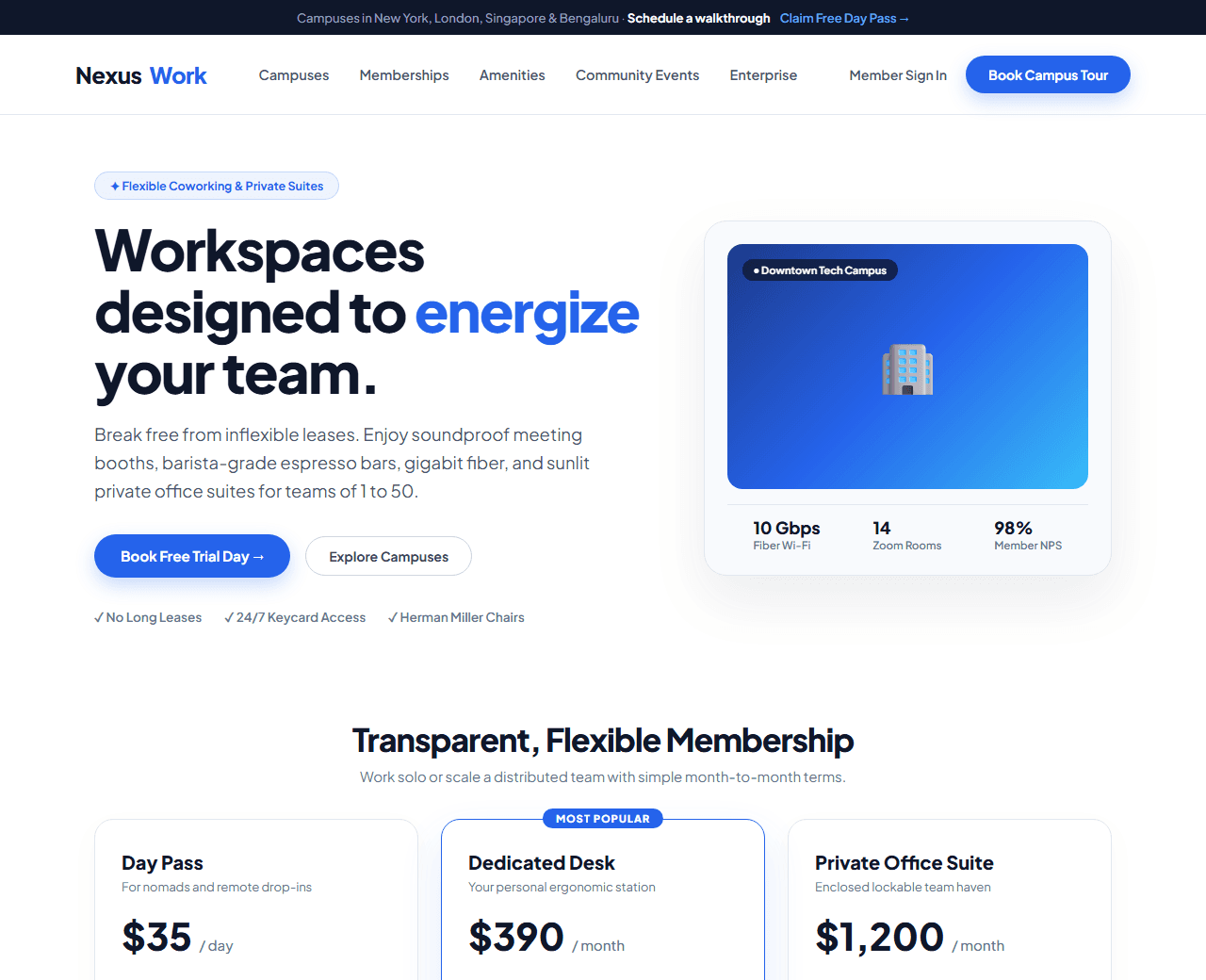
Example of the website this prompt builds. Your result will use your own name, text and images.
- Tech stack
- Next.js (App Router) + Tailwind CSS
- Colour palette
#ffffff#0f172a#2563eb#f59e0b
- What it builds
- City location switcher bar (Downtown Campus, Innovation Hub, Tech Quarter)
- Navbar with Book a Tour and Member Login
- Hero with bright architectural workspace photo & tour pass booking
- Membership tier cards (Hot Desk, Dedicated Desk, Private Team Suite)
- Amenities bento grid (Gigabit fiber, Soundproof booths, Artisan coffee, Meeting rooms)
- Interactive workspace floorplan preview with real-time seat availability
- Member community networking events calendar
- Enterprise team flex passes with custom floor design
- Book a complimentary 1-day pass form
- Footer with office directions and transit links
The prompt
Copy everything in the box. Text in quotes and the sample business details are meant to be replaced with your own.
Build a vibrant, inspiring coworking space and private office platform landing page called "NexusWork: Collaborative Workspaces for Teams".

Tech stack: Next.js (App Router) with Tailwind CSS.

Visual style: bright, modern, and productive. Clean white background (#ffffff), dark slate typography (#0f172a), electric corporate blue (#2563eb) for primary buttons, and energetic amber (#f59e0b) for community highlights. Sunlit workspace imagery and generous rounded cards.

Sections, in order:
1. Top Location Bar: "Campuses in New York, London, Singapore & Bengaluru. Tour today and get 1 free trial day."
2. Navbar: geometric desk logo, links ("Locations", "Memberships", "Amenities", "Events", "Enterprise"), and "Book a Tour" blue button.
3. Hero: split layout.
   - Left side: badge "✦ Premium Coworking & Private Suites", headline "Workspaces designed to energize your team", paragraph describing ergonomic Herman Miller seating, ultra-fast fiber internet, natural sunlight, and a thriving community of founders.
   - Right side: sunlit architectural photography placeholder of an open-plan lounge with indoor plants and espresso bar.
4. Flexible Membership Options: 3 pricing cards: 1) Day Pass ($35/day with lounge & cafe access), 2) Dedicated Desk ($390/mo with 24/7 access and filing locker), 3) Private Office Suite ($1,200/mo for teams of 2 to 20 with lockable private glass offices).
5. Work-Life Amenities Bento: 6 cards highlighting: Gigabit redundant Wi-Fi, soundproof privacy phone booths, unlimited specialty barista coffee & kombucha, bookable conference rooms with Zoom Room TV screens, dog-friendly policy, and rooftop terrace.
6. Community & Networking: monthly calendar cards showing upcoming events: Founder Breakfasts, Pitch Nights, and Yoga Wednesdays.
7. Enterprise Remote Team Plans: custom flex memberships for distributed companies needing hybrid office hub solutions.
8. Book a Free Day Pass: simple 3-field reservation card (Name, Work Email, Desired Campus Location, Date) with "Claim Free Day Pass" button.
9. Member Testimonials: reviews from remote engineers and startup founders praising focus, community, and hospitality.
10. Footer: campus addresses with parking information, terms of membership, and press inquiries.

Quality bar:
- Fully responsive: design mobile-first, then tablet (768px) and desktop (1200px).
- Accessible: semantic HTML landmarks, one h1, alt text on images, visible keyboard focus, colour contrast of at least 4.5:1 for body text.
- Fast: no heavy libraries, lazy-load images below the fold, system or two web fonts at most.
- Use placeholder images from a neutral source and realistic sample copy (no lorem ipsum).
- Respect prefers-reduced-motion for every animation.
- Keep the code clean and commented so I can edit it by hand.
How to use this prompt
- 1
Open an AI coding tool. Use any capable assistant: Claude, ChatGPT, Cursor, v0, Bolt, Gemini. Tools that can create files (Cursor, Claude Code, v0, Bolt) are the most convenient because they write the project for you.
- 2
Replace the sample details. Copy the prompt and change the business name, location, colours and any section you do not need. The more specific your details, the better the result.
- 3
Paste the prompt and generate. Send the whole prompt in one message. If the reply is cut off, say “continue from where you stopped”, or ask for one section at a time.
- 4
Run it on your computer. Create a project with “npx create-next-app@latest”, add the generated files, then run “npm run dev” and open http://localhost:3000.
- 5
Review and refine. Check it on a phone-width screen, fix anything that looks off by describing it in plain words, then use the follow-up prompts below to add features one at a time.
- 6
Replace placeholders and publish. Swap in your real text and images, then deploy. Vercel and Netlify both host this kind of site for free.
Follow-up prompts
Send these one at a time after the first version is working. Small, specific requests give much better results than one giant prompt.
Add interactive campus location switcher that updates pricing and photos.
Add interactive meeting room booking time-slot picker.
Add virtual 3D floor plan seat availability map modal.
Add OfficeSpace and LocalBusiness Schema.org structured data.
Tips for a better result
- Highlight amenities that remote workers miss at home (ergonomic furniture, phone booths, fast Wi-Fi).
- Keep the free trial day pass prominent to maximize lead capture.
- Want to hand-build a section instead? The Templates library has heroes, pricing tables, FAQs and more with full code.