Online Course & Learning Platform
An engaging e-learning LMS course portal featuring video syllabus modules, instructor credentials, skill level filters, and student reviews.
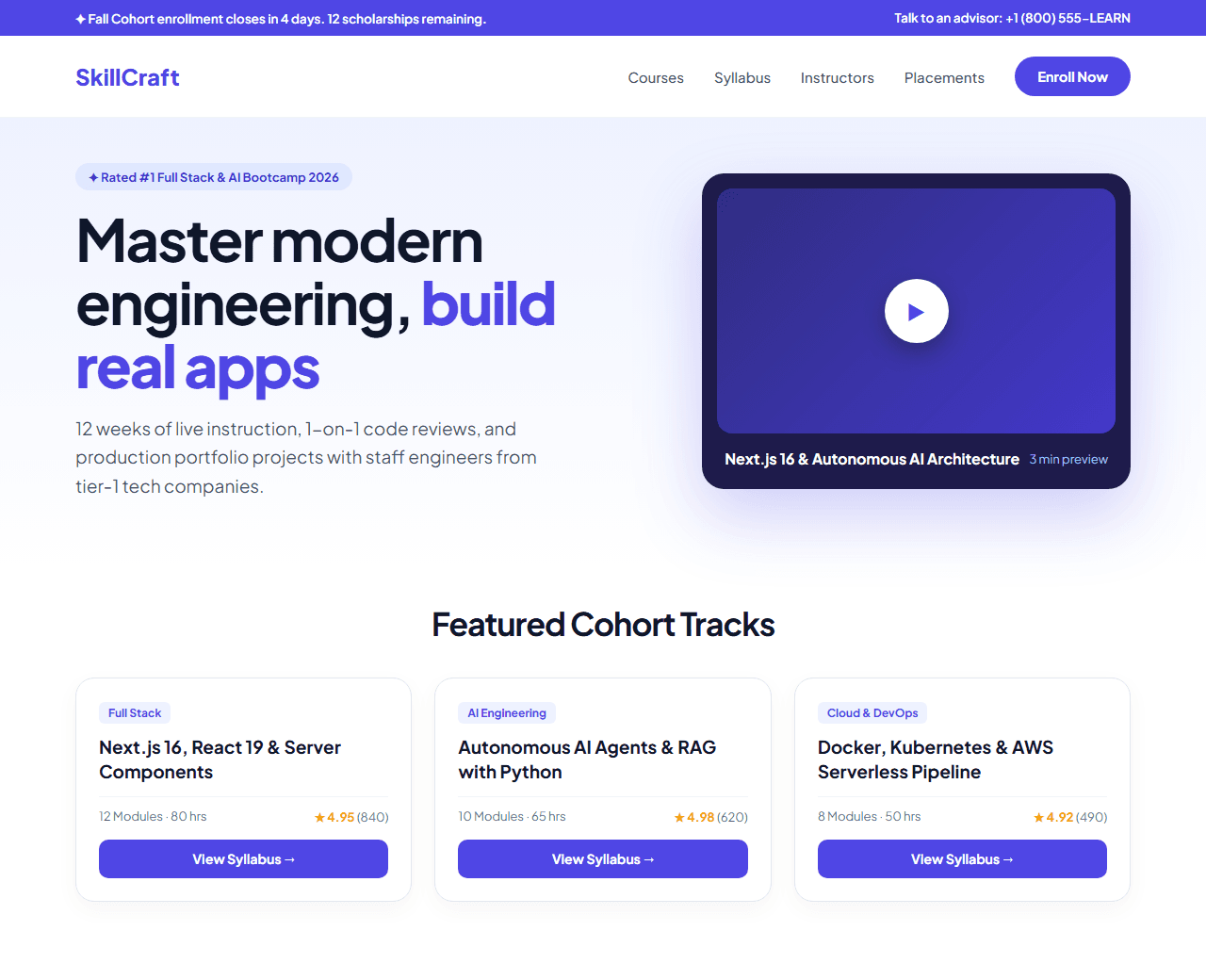
Example of the website this prompt builds. Your result will use your own name, text and images.
- Tech stack
- Next.js (App Router) + Tailwind CSS
- Colour palette
#ffffff#0f172a#4f46e5#f59e0b
- What it builds
- Top countdown banner ('Spring Cohort closes in 3 days')
- Navbar with Course Catalog dropdown and Student Portal login
- Hero with curriculum highlights and interactive video trailer preview
- Skill category filter pills (Full Stack, AI Engineering, Cloud)
- Curated course cards with instructor avatar, lesson count, and student rating
- Interactive course syllabus accordion with free preview lessons
- Instructor credentials and alumni placement company logos
- Student career outcome statistics (Average salary hike, hiring rate)
- Cohort enrollment pricing tiers with money-back guarantee badge
- Student FAQ accordion and comprehensive footer
The prompt
Copy everything in the box. Text in quotes and the sample business details are meant to be replaced with your own.
Build a high-converting, interactive online learning and cohort course website called "SkillCraft Academy: Master Modern AI & Full Stack".

Tech stack: Next.js (App Router) with Tailwind CSS. Clean component hierarchy.

Visual style: bright, credible, and energetic. Clean white background (#ffffff), dark slate headings (#0f172a), deep indigo (#4f46e5) for buttons and progress bars, amber (#f59e0b) for ratings and certification badges. Rounded 16px cards with subtle elevation shadows.

Sections, in order:
1. Top Urgent Bar: "Next live mentorship cohort begins in 6 days. Only 8 spots remaining."
2. Navbar: logo with graduation cap icon, links ("Courses", "Syllabus", "Mentors", "Placements", "Pricing"), and "Enroll Now" button.
3. Hero: split layout.
   - Left side: badge "✦ Top Rated Tech Bootcamp 2026", headline "Become a senior full stack & AI engineer in 12 weeks", supporting paragraph on project-based curriculum, 1-on-1 code reviews, and guaranteed portfolio output.
   - Right side: video preview card with video player overlay showing instructor code walkthrough, play button, and badge "Watch 3-minute Course Tour".
4. Track Record Bar: 4 stats: "94% Placement Rate", "$118,000 Average Starting Salary", "4.9/5 Rating (2,400+ Alumni)", "1:8 Mentor-Student Ratio".
5. Interactive Curriculum Syllabus: 6 expandable modules (e.g., Module 1: Advanced TypeScript & Architecture, Module 2: Next.js 16 Server Components & Turbopack, Module 3: AI Agents & Vector Databases). Each module shows duration, number of projects, and a clickable 'Preview Lesson' link.
6. Featured Projects You Will Build: 3 project cards with mockups: an AI SaaS with Stripe billing, a real-time collaborative workspace, and an enterprise mobile app.
7. Lead Instructors: 3 cards showing instructor photo, title (e.g., Former Staff Engineer @ Google, M.Tech IIT), and LinkedIn profile links.
8. Alumni Whereabouts: "Our graduates work at" with logos for Microsoft, Amazon, Stripe, Uber, and top startups.
9. Pricing & Guarantees: 2 options (Self-Paced $499, Live Mentorship Cohort $1,499 with monthly EMI plans and 14-day 100% money-back guarantee).
10. FAQ: 6 questions about prerequisites, time commitment, and job assistance.
11. Footer: campus locations, accreditation details, and terms.

Quality bar:
- Fully responsive: design mobile-first, then tablet (768px) and desktop (1200px).
- Accessible: semantic HTML landmarks, one h1, alt text on images, visible keyboard focus, colour contrast of at least 4.5:1 for body text.
- Fast: no heavy libraries, lazy-load images below the fold, system or two web fonts at most.
- Use placeholder images from a neutral source and realistic sample copy (no lorem ipsum).
- Respect prefers-reduced-motion for every animation.
- Keep the code clean and commented so I can edit it by hand.
How to use this prompt
- 1
Open an AI coding tool. Use any capable assistant: Claude, ChatGPT, Cursor, v0, Bolt, Gemini. Tools that can create files (Cursor, Claude Code, v0, Bolt) are the most convenient because they write the project for you.
- 2
Replace the sample details. Copy the prompt and change the business name, location, colours and any section you do not need. The more specific your details, the better the result.
- 3
Paste the prompt and generate. Send the whole prompt in one message. If the reply is cut off, say “continue from where you stopped”, or ask for one section at a time.
- 4
Run it on your computer. Create a project with “npx create-next-app@latest”, add the generated files, then run “npm run dev” and open http://localhost:3000.
- 5
Review and refine. Check it on a phone-width screen, fix anything that looks off by describing it in plain words, then use the follow-up prompts below to add features one at a time.
- 6
Replace placeholders and publish. Swap in your real text and images, then deploy. Vercel and Netlify both host this kind of site for free.
Follow-up prompts
Send these one at a time after the first version is working. Small, specific requests give much better results than one giant prompt.
Add interactive lesson video player modal when clicking preview buttons.
Add curriculum download modal that captures student email and phone number.
Add monthly EMI installment payment calculator.
Add Course and LearningResource JSON-LD structured data.
Tips for a better result
- Include realistic syllabus topics that reflect modern industry expectations (Next.js 16, LLMs, Vector DBs).
- Highlight the money-back guarantee prominently to eliminate buyer hesitation.
- Want to hand-build a section instead? The Templates library has heroes, pricing tables, FAQs and more with full code.