Veterinary Hospital & Pet Care
A comforting, comprehensive veterinary hospital website featuring 24/7 emergency dispatch, online booking, wellness packages, and doctor profiles.
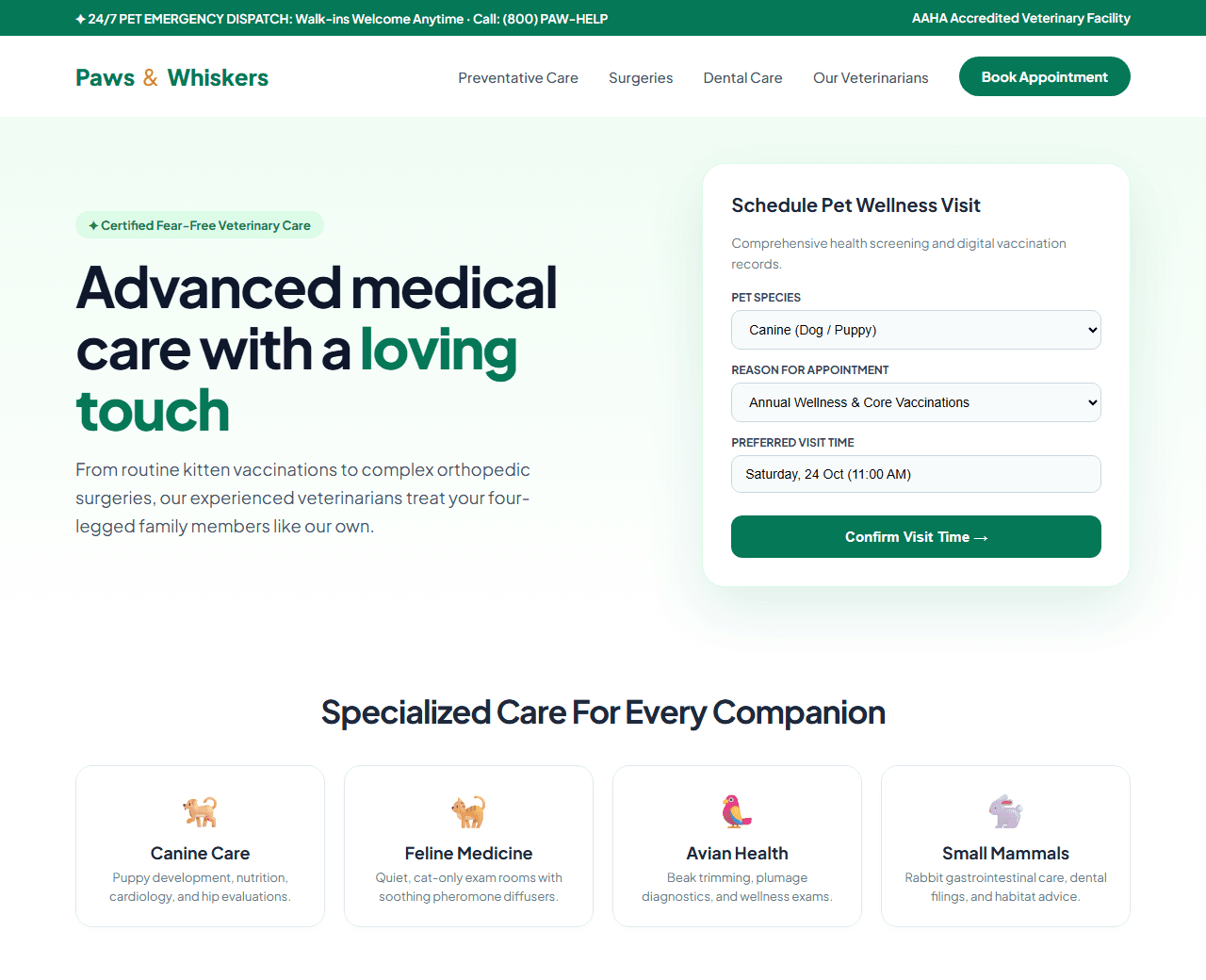
Example of the website this prompt builds. Your result will use your own name, text and images.
- Tech stack
- Next.js (App Router) + Tailwind CSS
- Colour palette
#ffffff#1e293b#059669#f59e0b
- What it builds
- 24/7 Emergency pet ambulance and urgent care hotline bar
- Navbar with Online Pet Portal and Book Appointment button
- Hero with compassionate veterinary care photo & booking card
- Pet species selector (Canine, Feline, Avian, Small Mammals)
- Comprehensive wellness packages & vaccination schedules
- Meet our licensed veterinary surgeons and certified vet nurses
- Modern clinic facilities photo tour (Digital X-Ray, Surgery Suite)
- Heartwarming pet recovery stories from local pet owners
- Pet nutrition and seasonal care advisory articles
- Clinic location, emergency parking map, and hours footer
The prompt
Copy everything in the box. Text in quotes and the sample business details are meant to be replaced with your own.
Build a compassionate, modern veterinary hospital and pet wellness clinic website called "Paws & Whiskers Animal Hospital".

Tech stack: Next.js (App Router) with Tailwind CSS.

Visual style: gentle, comforting, and warm. Crisp white background (#ffffff), dark slate text (#1e293b), medical forest green (#059669) for wellness actions, and soft honey amber (#f59e0b) for badges. Friendly photography framing and clean rounded cards.

Sections, in order:
1. Urgent Pet Care Bar: "24/7 Emergency Pet Care Available: (800) PAW-HELP. Walk-ins accepted 24 hours a day."
2. Navbar: logo with dog and cat silhouette, links ("Services", "Wellness Plans", "Veterinarians", "Pet Portal", "Contact"), and "Book Appointment" green button.
3. Hero: split layout.
   - Left side: badge "✦ AAHA-Accredited Animal Hospital", headline "Advanced medical care with a gentle, loving touch", paragraph detailing fear-free clinical techniques, preventative wellness, and surgical care.
   - Right side: an appointment booking card with Pet Type (Dog, Cat, Exotic), Reason for Visit (Wellness Checkup, Vaccines, Dental, Surgery), Preferred Date, and "Schedule Visit" button.
4. Species We Treat: 4 circular cards: Dogs, Cats, Birds & Parrots, and Small Mammals (Rabbits, Guinea Pigs).
5. Comprehensive Veterinary Services: 6 service cards: 1) Preventative Wellness & Vaccinations, 2) Soft Tissue & Orthopedic Surgery, 3) Advanced Dental Cleanings & Extractions, 4) In-House Digital Radiology & Ultrasound, 5) Pet Dermatology & Allergy Care, 6) Senior Pet Geriatric Care.
6. Monthly Wellness Membership Plans: 2 transparent packages (Puppy/Kitten Care Plan vs Adult Pet Complete) with unlimited exams and core vaccines included.
7. Meet Our Veterinarians: 2 doctor cards with DVM degrees, residency fellowships, beloved personal pets, and compassionate care philosophy.
8. Patient Success Stories: heartwarming pet photos with owner testimonials praising surgical outcomes and bedside manner.
9. Clinic Location & Emergency Parking: operating hours (Open 365 days a year), address, and direct Google Maps link.
10. Footer: emergency poison control numbers, microchip registration links, and copyright.

Quality bar:
- Fully responsive: design mobile-first, then tablet (768px) and desktop (1200px).
- Accessible: semantic HTML landmarks, one h1, alt text on images, visible keyboard focus, colour contrast of at least 4.5:1 for body text.
- Fast: no heavy libraries, lazy-load images below the fold, system or two web fonts at most.
- Use placeholder images from a neutral source and realistic sample copy (no lorem ipsum).
- Respect prefers-reduced-motion for every animation.
- Keep the code clean and commented so I can edit it by hand.
How to use this prompt
- 1
Open an AI coding tool. Use any capable assistant: Claude, ChatGPT, Cursor, v0, Bolt, Gemini. Tools that can create files (Cursor, Claude Code, v0, Bolt) are the most convenient because they write the project for you.
- 2
Replace the sample details. Copy the prompt and change the business name, location, colours and any section you do not need. The more specific your details, the better the result.
- 3
Paste the prompt and generate. Send the whole prompt in one message. If the reply is cut off, say “continue from where you stopped”, or ask for one section at a time.
- 4
Run it on your computer. Create a project with “npx create-next-app@latest”, add the generated files, then run “npm run dev” and open http://localhost:3000.
- 5
Review and refine. Check it on a phone-width screen, fix anything that looks off by describing it in plain words, then use the follow-up prompts below to add features one at a time.
- 6
Replace placeholders and publish. Swap in your real text and images, then deploy. Vercel and Netlify both host this kind of site for free.
Follow-up prompts
Send these one at a time after the first version is working. Small, specific requests give much better results than one giant prompt.
Add interactive pet age to human years calculator tool.
Add pet symptom checker quiz recommending emergency vs routine care.
Add new patient digital intake form modal.
Add VeterinaryCare and LocalBusiness Schema.org structured data.
Tips for a better result
- Feature emergency contact numbers on every page for anxious pet owners.
- Highlight 'Fear-Free Certified' methods to reassure owners of nervous animals.
- Want to hand-build a section instead? The Templates library has heroes, pricing tables, FAQs and more with full code.