Admin Dashboard
A clean analytics dashboard layout with a collapsible sidebar, KPI cards, charts and a sortable data table.
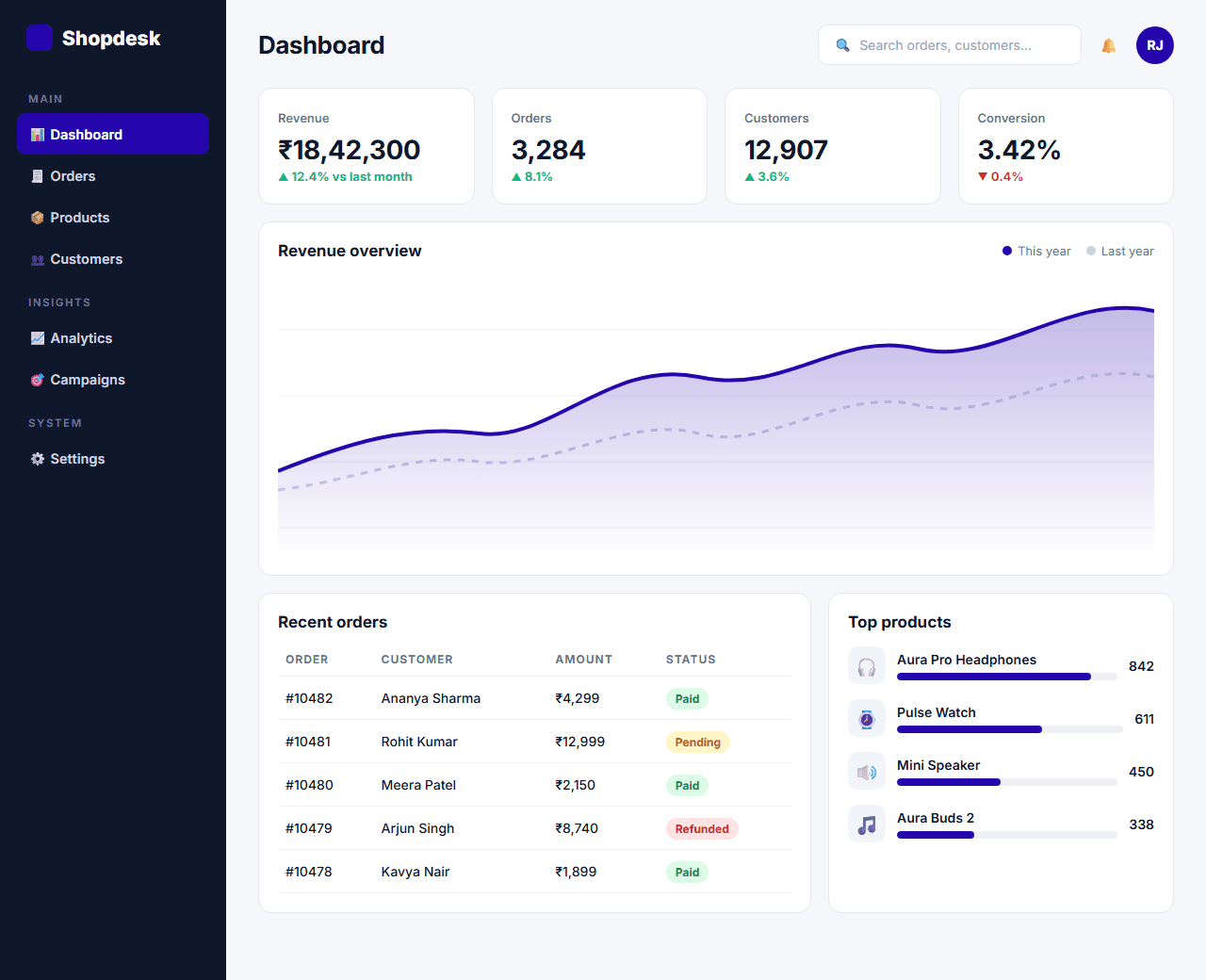
Example of the website this prompt builds. Your result will use your own name, text and images.
- Tech stack
- Next.js (App Router) + Tailwind CSS
- Colour palette
#f6f7fb#0f172a#2506ad#10b981
- What it builds
- Collapsible sidebar
- Top bar with search
- KPI cards
- Revenue chart
- Recent orders table
- Activity feed
- Top products
The prompt
Copy everything in the box. Text in quotes and the sample business details are meant to be replaced with your own.
Build an admin dashboard home screen for an e-commerce business.

Tech stack: Next.js (App Router) with Tailwind CSS. Use a shared layout for the sidebar and top bar so other dashboard pages can reuse it. Charts can be drawn with inline SVG - do not add a charting library.

Visual style: calm and data-dense but readable. Light grey app background (#f6f7fb), white cards with a 1px border and 14px radius, dark slate text (#0f172a), indigo (#2506ad) for active states and green (#10b981) / red for positive and negative changes. Numbers use tabular figures.

Layout:
1. Sidebar (240px, collapsible to 72px icons-only): logo, navigation groups (Dashboard, Orders, Products, Customers, Analytics, Settings) with icons, the active item highlighted, and a user profile block at the bottom. On mobile it becomes an off-canvas drawer.
2. Top bar: page title, search field, a notifications bell with a badge, and a user avatar menu.
3. KPI row: four cards (Revenue, Orders, Customers, Conversion rate), each with the value, the percentage change versus last month with an up/down arrow, and a tiny sparkline.
4. Main chart: revenue over the last 12 months as an SVG area chart with axis labels and a "This year / Last year" legend.
5. Two columns below:
   - Recent orders table: order ID, customer, date, amount in rupees, status badge (Paid, Pending, Refunded) and an actions menu. Column headers are sortable.
   - Activity feed: a timeline of recent events.
6. Top products: a list of five products with a thumbnail, units sold and a progress bar.

Behaviour: the sidebar collapse state persists in localStorage; clicking a table header sorts by that column; the date-range select in the top right (7 days, 30 days, 12 months) updates the KPI numbers (use sample data).

Quality bar:
- Fully responsive: design mobile-first, then tablet (768px) and desktop (1200px).
- Accessible: semantic HTML landmarks, one h1, alt text on images, visible keyboard focus, colour contrast of at least 4.5:1 for body text.
- Fast: no heavy libraries, lazy-load images below the fold, system or two web fonts at most.
- Use placeholder images from a neutral source and realistic sample copy (no lorem ipsum).
- Respect prefers-reduced-motion for every animation.
- Keep the code clean and commented so I can edit it by hand.
How to use this prompt
- 1
Open an AI coding tool. Use any capable assistant: Claude, ChatGPT, Cursor, v0, Bolt, Gemini. Tools that can create files (Cursor, Claude Code, v0, Bolt) are the most convenient because they write the project for you.
- 2
Replace the sample details. Copy the prompt and change the business name, location, colours and any section you do not need. The more specific your details, the better the result.
- 3
Paste the prompt and generate. Send the whole prompt in one message. If the reply is cut off, say “continue from where you stopped”, or ask for one section at a time.
- 4
Run it on your computer. Create a project with “npx create-next-app@latest”, add the generated files, then run “npm run dev” and open http://localhost:3000.
- 5
Review and refine. Check it on a phone-width screen, fix anything that looks off by describing it in plain words, then use the follow-up prompts below to add features one at a time.
- 6
Replace placeholders and publish. Swap in your real text and images, then deploy. Vercel and Netlify both host this kind of site for free.
Follow-up prompts
Send these one at a time after the first version is working. Small, specific requests give much better results than one giant prompt.
Add a dark theme driven by CSS variables with a toggle in the top bar.
Build the Orders page with filters, pagination and a row-detail drawer.
Replace the sample data with data fetched in Server Components and add loading skeletons with Suspense.
Add role-based navigation so 'Settings' only appears for admins.
Tips for a better result
- Dashboards should answer questions. Put the one number that matters most in the top-left.
- Do not rely on colour alone for status; pair it with text or an icon.
- Want to hand-build a section instead? The Templates library has heroes, pricing tables, FAQs and more with full code.