Artisan Bakery & Custom Patisserie
A warm, inviting artisan bakery and French patisserie website with daily fresh bread menus, custom cake builders, and grain provenance stories.
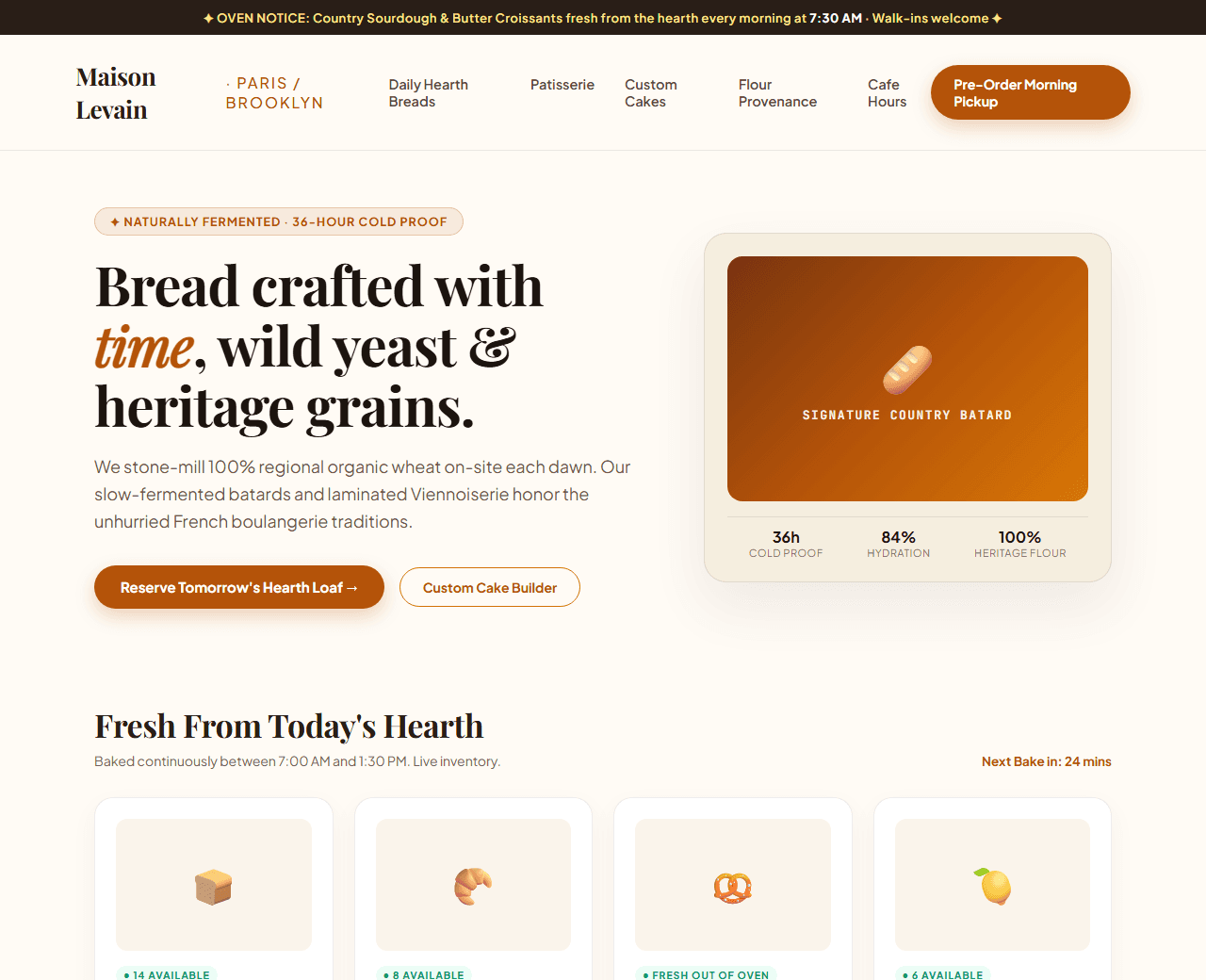
Example of the website this prompt builds. Your result will use your own name, text and images.
- Tech stack
- Next.js (App Router) + Tailwind CSS
- Colour palette
#fffbf5#291e17#b45309#d97706
- What it builds
- Daily fresh oven baking schedule ribbon ('Warm sourdough ready at 7:30 AM')
- Navbar with Daily Bread Counter and Custom Cake Inquiries
- Hero with slow-fermented artisan sourdough loaf & French patisserie
- Daily fresh pastry menu with live sold-out counter
- Custom wedding and celebration cake consultation builder
- Flour provenance: 100% stone-ground regional heritage grain story
- Local bakery cafe hours, morning coffee menu & pickup times
- Neighborhood patron reviews
- Weekend brunch pastry box subscription signup
- Footer with allergen guide and artisan credentials
The prompt
Copy everything in the box. Text in quotes and the sample business details are meant to be replaced with your own.
Build an inviting, sensory artisan bakery and French pastry shop website called "Maison Levain: Artisan Sourdough & Patisserie".

Tech stack: Next.js (App Router) with Tailwind CSS.

Visual style: rustic European warm aesthetic. Warm butter/cream background (#fffbf5), deep roasted walnut typography (#291e17), amber honey accents (#b45309), and golden crust borders (#d97706). Warm food photography, elegant serif headings, and craft bakery illustrations.

Sections, in order:
1. Daily Oven Ribbon: "✦ OVEN NOTICE: Country Sourdough & Pain au Chocolat fresh from the stone hearth every morning at 7:30 AM ✦".
2. Navbar: flour sheaf wordmark logo, links ("Daily Breads", "Patisserie", "Custom Cakes", "Our Flour", "Cafe Hours"), and "Pre-Order Pickup" button.
3. Hero: split layout.
   - Left side: badge "✦ Naturally Fermented · 36-Hour Cold Proof", headline "Bread crafted with time, wild yeast, and ancient grains", paragraph explaining stone-milled heritage flours, open crumb texture, and caramelized blisters.
   - Right side: close-up photo placeholder of a freshly scored country sourdough batard with ear blister detail.
4. Daily Bread & Pastry Counter: 4 product cards: 1) Signature Country Sourdough Loaf ($9.50), 2) French Butter Croissant ($4.50), 3) Cardamom Morning Bun ($5.00), 4) Meyer Lemon Tartlet ($6.50). Each card has allergen badges and a live 'In Stock' badge.
5. Custom Celebratory Cake Consultation: 3-step interactive cake builder: 1) Pick size (6-inch, 8-inch, 3-tier wedding), 2) Choose sponge (Olive Oil Citrus, Dark Valrhona Chocolate, Pistachio), 3) Select botanical finish.
6. The Flour Story: provenance explanation of organic grains sourced directly from local regenerative wheat farmers.
7. Neighborhood Cafe & Espresso Bar: cafe opening hours (Tuesday-Sunday: 7am - 3pm), address, and coffee menu highlights.
8. Customer Love: quotes from neighborhood regulars and culinary reviewers.
9. Weekend Baker's Box: email signup for exclusive Saturday morning pastry box reservations.
10. Footer: allergen statements (Gluten, Nuts, Dairy), wholesale delivery inquiries, and copyright.

Quality bar:
- Fully responsive: design mobile-first, then tablet (768px) and desktop (1200px).
- Accessible: semantic HTML landmarks, one h1, alt text on images, visible keyboard focus, colour contrast of at least 4.5:1 for body text.
- Fast: no heavy libraries, lazy-load images below the fold, system or two web fonts at most.
- Use placeholder images from a neutral source and realistic sample copy (no lorem ipsum).
- Respect prefers-reduced-motion for every animation.
- Keep the code clean and commented so I can edit it by hand.
How to use this prompt
- 1
Open an AI coding tool. Use any capable assistant: Claude, ChatGPT, Cursor, v0, Bolt, Gemini. Tools that can create files (Cursor, Claude Code, v0, Bolt) are the most convenient because they write the project for you.
- 2
Replace the sample details. Copy the prompt and change the business name, location, colours and any section you do not need. The more specific your details, the better the result.
- 3
Paste the prompt and generate. Send the whole prompt in one message. If the reply is cut off, say “continue from where you stopped”, or ask for one section at a time.
- 4
Run it on your computer. Create a project with “npx create-next-app@latest”, add the generated files, then run “npm run dev” and open http://localhost:3000.
- 5
Review and refine. Check it on a phone-width screen, fix anything that looks off by describing it in plain words, then use the follow-up prompts below to add features one at a time.
- 6
Replace placeholders and publish. Swap in your real text and images, then deploy. Vercel and Netlify both host this kind of site for free.
Follow-up prompts
Send these one at a time after the first version is working. Small, specific requests give much better results than one giant prompt.
Add interactive custom cake flavor combination simulator.
Add real-time stock badge toggle (Available vs Sold Out).
Add online local pickup time slot scheduler.
Add Bakery and FoodEstablishment Schema.org structured data.
Tips for a better result
- Use rich warm tones and sensory descriptions of crust, crumb, and aroma.
- Keep pre-order buttons prominent to encourage morning pickup reservations.
- Want to hand-build a section instead? The Templates library has heroes, pricing tables, FAQs and more with full code.