Luxury Car Rental & Fleet Booking
A luxury car rental and chauffeur service website with vehicle category filters, performance specs, daily rates, and reservation booking flow.
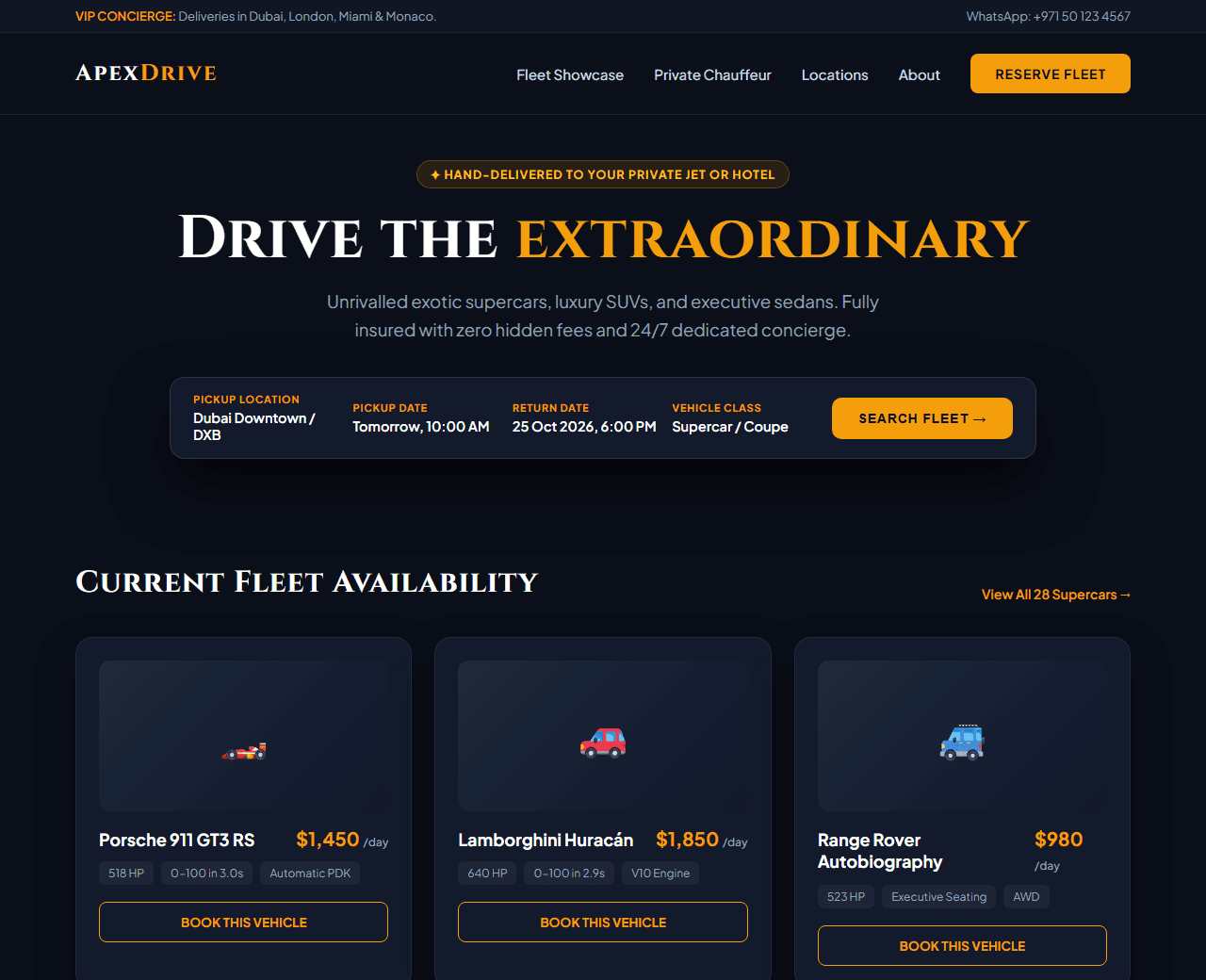
Example of the website this prompt builds. Your result will use your own name, text and images.
- Tech stack
- Next.js (App Router) + Tailwind CSS
- Colour palette
#0b0f19#ffffff#f59e0b#64748b
- What it builds
- VIP Concierge header with direct WhatsApp booking
- Sticky navbar with Fleet category filters
- Hero with instant date & pickup location search bar
- Curated luxury fleet grid (Supercars, SUVs, Chauffeur sedans)
- Vehicle spec pills (0-100 km/h, Horsepower, Top Speed, Daily Rate)
- Exclusive concierge perks (Airport delivery, zero deposit options)
- Step-by-step reservation process
- Customer reviews from verified executives
- Booking advisory FAQ
- Footer with city locations
The prompt
Copy everything in the box. Text in quotes and the sample business details are meant to be replaced with your own.
Build a high-end luxury and exotic car rental website called "ApexDrive Private Fleet".

Tech stack: Next.js (App Router) with Tailwind CSS.

Visual style: sleek, prestigious dark aesthetic. Obsidian background (#0b0f19), white headings, amber/gold (#f59e0b) for accents and star ratings, muted platinum (#94a3b8) for secondary copy. Razor-sharp 12px border radius, high-resolution automobile photo placeholders, and generous padding.

Sections, in order:
1. Top Concierge Strip: "Private deliveries available in Dubai, London, Miami & Mumbai. 24/7 WhatsApp Concierge" with phone number.
2. Navbar: sleek wordmark logo, links ("Fleet", "Chauffeur", "Services", "Locations", "About"), and "Reserve Now" gold button.
3. Hero: background with moody sports car silhouette. Headline "Drive the extraordinary", subtitle explaining curated exotic sports cars and luxury SUVs delivered to your private terminal or hotel.
4. Reservation Search Bar: sleek horizontal booking bar with Pickup City dropdown, Pickup Date, Return Date, Vehicle Category (Supercar, Luxury SUV, Executive Sedan), and "Search Fleet" button.
5. Fleet Showcase: 6 vehicle cards featuring high-end cars (Porsche 911 GT3, Lamborghini Huracán, Range Rover Autobiography, Rolls Royce Ghost). Each card has: car image, make & model, daily rental rate in USD/AED, 3 spec badges (Horsepower e.g. 640 HP, 0-100 km/h e.g. 2.9s, Automatic), and "Reserve Vehicle" button.
6. The Apex Experience: 4 VIP perks: Airport tarmac drop-off, comprehensive insurance included, flexible cancelation, and 24/7 personal chauffeur on demand.
7. Simple 3-Step Process: 1) Select dream vehicle, 2) Instant identity & license verification, 3) Key handover at your chosen address.
8. Client Testimonials: 3 quotes from executive clients and luxury travelers.
9. Rental FAQ: 5 questions covering security deposits, international driving permits, and mileage policies.
10. Footer: office addresses in 4 global cities, luxury concierge contact, terms of service.

Quality bar:
- Fully responsive: design mobile-first, then tablet (768px) and desktop (1200px).
- Accessible: semantic HTML landmarks, one h1, alt text on images, visible keyboard focus, colour contrast of at least 4.5:1 for body text.
- Fast: no heavy libraries, lazy-load images below the fold, system or two web fonts at most.
- Use placeholder images from a neutral source and realistic sample copy (no lorem ipsum).
- Respect prefers-reduced-motion for every animation.
- Keep the code clean and commented so I can edit it by hand.
How to use this prompt
- 1
Open an AI coding tool. Use any capable assistant: Claude, ChatGPT, Cursor, v0, Bolt, Gemini. Tools that can create files (Cursor, Claude Code, v0, Bolt) are the most convenient because they write the project for you.
- 2
Replace the sample details. Copy the prompt and change the business name, location, colours and any section you do not need. The more specific your details, the better the result.
- 3
Paste the prompt and generate. Send the whole prompt in one message. If the reply is cut off, say “continue from where you stopped”, or ask for one section at a time.
- 4
Run it on your computer. Create a project with “npx create-next-app@latest”, add the generated files, then run “npm run dev” and open http://localhost:3000.
- 5
Review and refine. Check it on a phone-width screen, fix anything that looks off by describing it in plain words, then use the follow-up prompts below to add features one at a time.
- 6
Replace placeholders and publish. Swap in your real text and images, then deploy. Vercel and Netlify both host this kind of site for free.
Follow-up prompts
Send these one at a time after the first version is working. Small, specific requests give much better results than one giant prompt.
Add interactive category filter buttons to swap between Supercars, SUVs, and Sedans instantly.
Add an interactive deposit and daily price calculator based on rental duration.
Add WhatsApp 1-click booking pre-fill with the selected car name.
Add SEO schema for AutoRental and Product rich snippets.
Tips for a better result
- Vehicle specifications should be prominent; renters want horsepower and 0-60 times immediately.
- Emphasize delivery convenience and transparent pricing without hidden surprise fees.
- Want to hand-build a section instead? The Templates library has heroes, pricing tables, FAQs and more with full code.