Fintech App Landing Page
A trustworthy landing page for a personal-finance or payments app, with a phone mockup, security messaging and app-store calls to action.
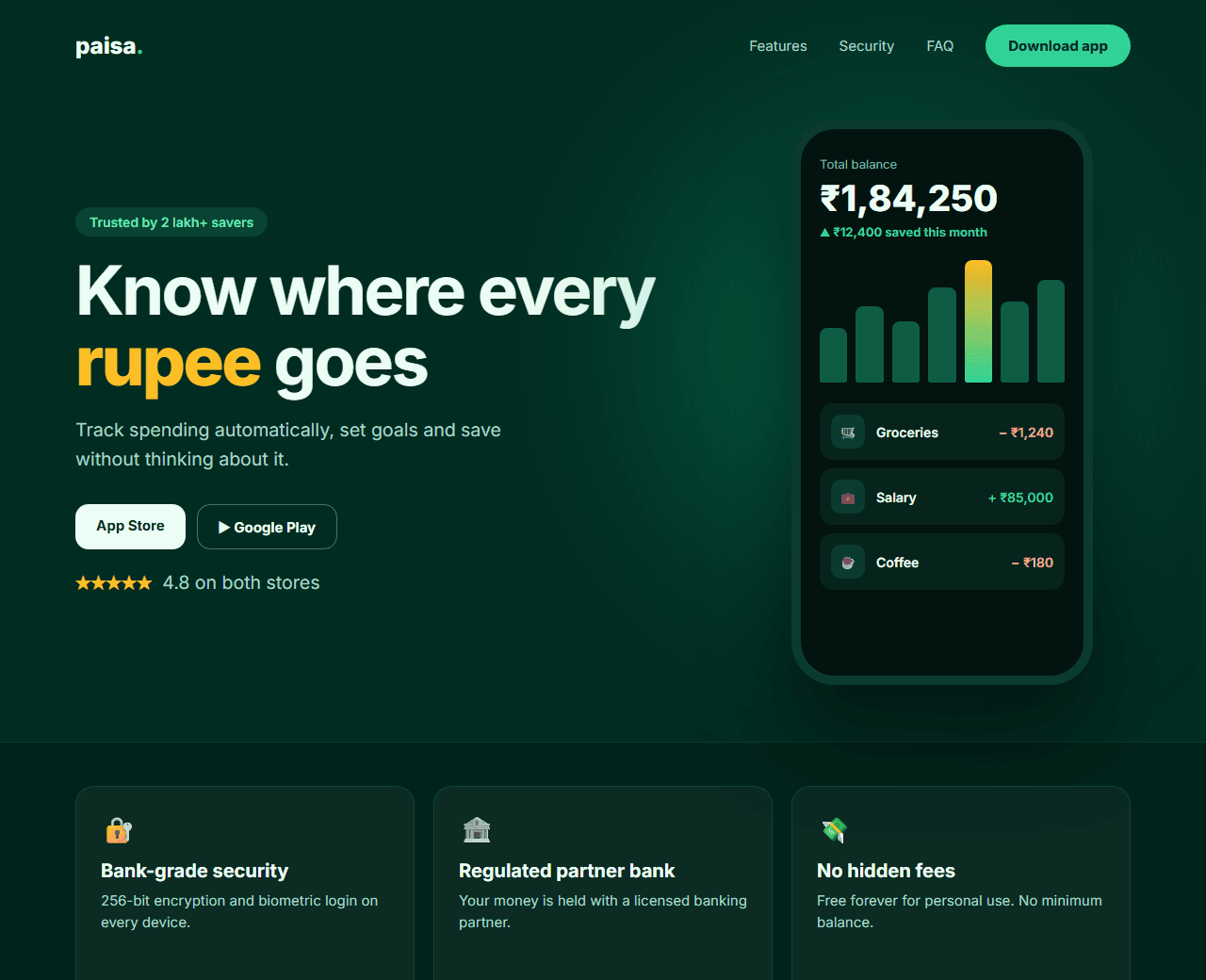
Example of the website this prompt builds. Your result will use your own name, text and images.
- Tech stack
- Next.js (App Router) + Tailwind CSS
- Colour palette
#022c22#ecfdf5#34d399#fbbf24
- What it builds
- Navbar
- Hero with phone mockup
- Trust bar
- Feature rows
- Security section
- How it works
- App download CTA
- FAQ
- Footer with disclosures
The prompt
Copy everything in the box. Text in quotes and the sample business details are meant to be replaced with your own.
Build a landing page for a personal finance mobile app called "Paisa", which helps users track spending and save automatically.

Tech stack: Next.js (App Router) with Tailwind CSS.

Visual style: calm and trustworthy. Deep green background (#022c22) with mint text (#ecfdf5), emerald (#34d399) for primary actions and a small amount of gold (#fbbf24) for highlights. Rounded 20px cards, clear hierarchy, no flashy effects - finance users value clarity.

Sections, in order:
1. Navbar: logo, Features, Security, FAQ, and a "Download app" button.
2. Hero, two columns: headline ("Know where every rupee goes"), one sentence, App Store and Google Play buttons, and a rating line. On the right, a CSS-drawn phone mockup showing a balance, a small spending chart and three recent transactions.
3. Trust bar: three short statements with icons (bank-grade encryption, regulated partner bank, no hidden fees).
4. Features: three alternating image-and-text rows (Track spending automatically, Set savings goals, Split bills with friends), each with a mini UI illustration built from HTML/CSS.
5. Security: a focused section explaining how data is protected, with four points in a 2x2 grid.
6. How it works: three steps (Download, Link your account, Start saving).
7. Download CTA: a large rounded panel with the app buttons and a QR-code placeholder.
8. FAQ: six questions, including fees and data privacy.
9. Footer with legal links and a clearly worded regulatory disclosure placeholder.

Interactions: numbers in the phone mockup count up when it scrolls into view; feature rows fade in.

Quality bar:
- Fully responsive: design mobile-first, then tablet (768px) and desktop (1200px).
- Accessible: semantic HTML landmarks, one h1, alt text on images, visible keyboard focus, colour contrast of at least 4.5:1 for body text.
- Fast: no heavy libraries, lazy-load images below the fold, system or two web fonts at most.
- Use placeholder images from a neutral source and realistic sample copy (no lorem ipsum).
- Respect prefers-reduced-motion for every animation.
- Keep the code clean and commented so I can edit it by hand.
How to use this prompt
- 1
Open an AI coding tool. Use any capable assistant: Claude, ChatGPT, Cursor, v0, Bolt, Gemini. Tools that can create files (Cursor, Claude Code, v0, Bolt) are the most convenient because they write the project for you.
- 2
Replace the sample details. Copy the prompt and change the business name, location, colours and any section you do not need. The more specific your details, the better the result.
- 3
Paste the prompt and generate. Send the whole prompt in one message. If the reply is cut off, say “continue from where you stopped”, or ask for one section at a time.
- 4
Run it on your computer. Create a project with “npx create-next-app@latest”, add the generated files, then run “npm run dev” and open http://localhost:3000.
- 5
Review and refine. Check it on a phone-width screen, fix anything that looks off by describing it in plain words, then use the follow-up prompts below to add features one at a time.
- 6
Replace placeholders and publish. Swap in your real text and images, then deploy. Vercel and Netlify both host this kind of site for free.
Follow-up prompts
Send these one at a time after the first version is working. Small, specific requests give much better results than one giant prompt.
Add a savings calculator: sliders for monthly amount and years that show the projected total.
Add a comparison table versus spreadsheets and traditional bank apps.
Create a /security page that expands on encryption, data handling and compliance.
Tips for a better result
- Financial claims must be accurate and compliant. Replace every placeholder disclosure with wording approved for your product.
- Avoid promising returns. Describe features, not outcomes.
- Want to hand-build a section instead? The Templates library has heroes, pricing tables, FAQs and more with full code.