Link-in-Bio Page
A fast, single-file link-in-bio page for creators and freelancers: avatar, short bio, stacked link buttons and social icons.
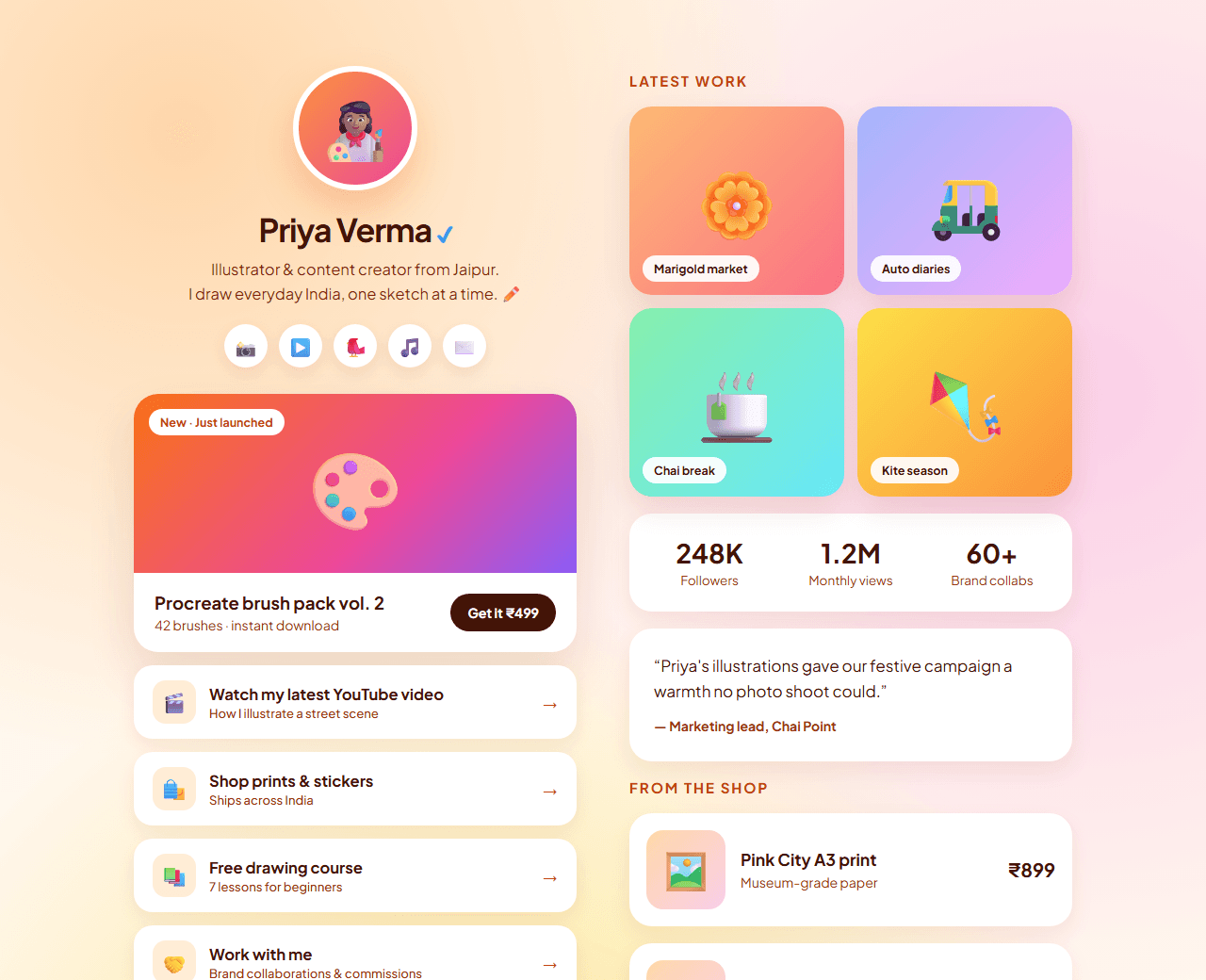
Example of the website this prompt builds. Your result will use your own name, text and images.
- Tech stack
- Single HTML file with CSS
- Colour palette
#fff7ed#1c1917#ea580c#2506ad
- What it builds
- Avatar and bio
- Social icons
- Link buttons
- Featured content card
- Newsletter signup
- Footer
The prompt
Copy everything in the box. Text in quotes and the sample business details are meant to be replaced with your own.
Build a "link in bio" page for a content creator, as a single self-contained HTML file with inline CSS and no JavaScript frameworks.

Person (replace with your own): "Priya Verma", a UI designer and YouTuber who teaches design to beginners.

Visual style: warm and friendly. Soft peach background (#fff7ed), near-black text (#1c1917), orange (#ea580c) for the primary link and indigo (#2506ad) for accents. A single centred column, max-width 480px, generous spacing, large touch targets.

Content, top to bottom:
1. Circular avatar (placeholder image) with a thin ring, name, a one-line bio and a location line.
2. A row of social icon links (YouTube, Instagram, LinkedIn, X) as inline SVGs with accessible labels.
3. A stack of 6 full-width link buttons, each with an emoji or icon, a title and an optional small subtitle. The first one is highlighted as the primary link ("Watch my latest video"). Buttons have 14px radius, a 1px border, and lift slightly with a shadow on hover and focus.
4. A featured content card with a thumbnail, title and short description.
5. A compact newsletter signup (email field and button).
6. A small footer line: "Made with HTML and CSS".

Requirements: the whole page must weigh very little and load instantly; use system fonts; each link button must be at least 52px tall; include Open Graph meta tags so the page previews nicely when shared.

Quality bar:
- Fully responsive: design mobile-first, then tablet (768px) and desktop (1200px).
- Accessible: semantic HTML landmarks, one h1, alt text on images, visible keyboard focus, colour contrast of at least 4.5:1 for body text.
- Fast: no heavy libraries, lazy-load images below the fold, system or two web fonts at most.
- Use placeholder images from a neutral source and realistic sample copy (no lorem ipsum).
- Respect prefers-reduced-motion for every animation.
- Keep the code clean and commented so I can edit it by hand.
How to use this prompt
- 1
Open an AI coding tool. Use any capable assistant: Claude, ChatGPT, Cursor, v0, Bolt, Gemini. Tools that can create files (Cursor, Claude Code, v0, Bolt) are the most convenient because they write the project for you.
- 2
Replace the sample details. Copy the prompt and change the business name, location, colours and any section you do not need. The more specific your details, the better the result.
- 3
Paste the prompt and generate. Send the whole prompt in one message. If the reply is cut off, say “continue from where you stopped”, or ask for one section at a time.
- 4
Run it on your computer. Save the result as index.html and open it in your browser. No installation is needed.
- 5
Review and refine. Check it on a phone-width screen, fix anything that looks off by describing it in plain words, then use the follow-up prompts below to add features one at a time.
- 6
Replace placeholders and publish. Swap in your real text and images, then deploy. Vercel and Netlify both host this kind of site for free.
Follow-up prompts
Send these one at a time after the first version is working. Small, specific requests give much better results than one giant prompt.
Add a light/dark theme toggle that respects the system preference.
Add a subtle staggered fade-in animation for the link buttons on page load.
Convert it to a Next.js page where the links come from a JSON file.
Add click tracking using a privacy-friendly analytics snippet.
Tips for a better result
- Put your single most important link first. Most visitors only tap one.
- Keep it to 5-7 links; long lists reduce clicks on everything.
- Want to hand-build a section instead? The Templates library has heroes, pricing tables, FAQs and more with full code.