Wedding Invitation Website
An elegant single-page digital wedding invitation with a countdown, event schedule, venue details, photo gallery and RSVP form.
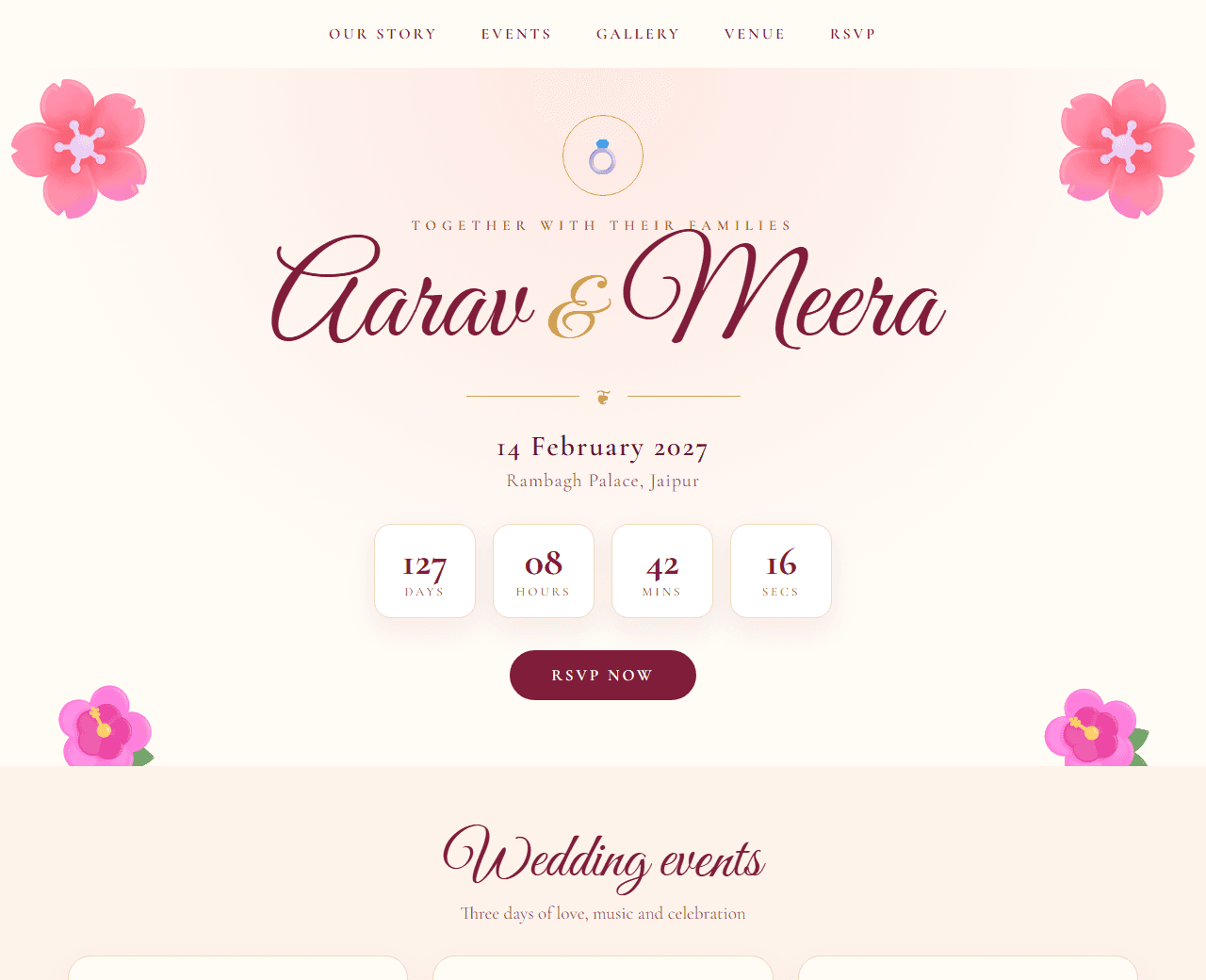
Example of the website this prompt builds. Your result will use your own name, text and images.
- Tech stack
- Single HTML file with CSS and vanilla JavaScript
- Colour palette
#fffbf5#4a1d24#be123c#b8860b
- What it builds
- Cover with names
- Countdown timer
- Our story
- Events schedule
- Venue and map
- Gallery
- RSVP form
- Footer
The prompt
Copy everything in the box. Text in quotes and the sample business details are meant to be replaced with your own.
Build a digital wedding invitation as a single HTML file with inline CSS and a little vanilla JavaScript.

Couple (replace with your own): Aarav and Meera, getting married on 14 February 2027 in Jaipur.

Visual style: elegant and festive. Ivory background (#fffbf5), deep maroon text (#4a1d24), rose (#be123c) and antique gold (#b8860b) accents. An ornamental serif or script font for names and headings, a clean serif for body text. Thin gold dividers and a subtle floral or paisley corner motif drawn with CSS or inline SVG.

Sections, in order:
1. Cover: "Together with their families", the couple's names in large script type, the date and city, and a "Scroll to continue" hint.
2. Countdown: days, hours, minutes and seconds until the wedding date, updating every second.
3. Our story: a short paragraph and a photo placeholder in an arched frame.
4. Events: a vertical timeline of ceremonies (Mehendi, Sangeet, Haldi, Wedding, Reception), each with date, time, venue and dress code.
5. Venue: the venue name, address, a map placeholder and an "Open in Maps" button.
6. Gallery: six photos in a responsive grid with a gentle hover zoom.
7. RSVP: a form with name, number of guests, attending yes/no and a message, plus a "Reply on WhatsApp" button that opens WhatsApp with a pre-filled message.
8. Footer: a thank-you line and a hashtag.

Requirements: mobile-first (most guests will open it on a phone from WhatsApp), light enough to load on slow connections, and with Open Graph tags so the link shows a nice preview card when shared.

Quality bar:
- Fully responsive: design mobile-first, then tablet (768px) and desktop (1200px).
- Accessible: semantic HTML landmarks, one h1, alt text on images, visible keyboard focus, colour contrast of at least 4.5:1 for body text.
- Fast: no heavy libraries, lazy-load images below the fold, system or two web fonts at most.
- Use placeholder images from a neutral source and realistic sample copy (no lorem ipsum).
- Respect prefers-reduced-motion for every animation.
- Keep the code clean and commented so I can edit it by hand.
How to use this prompt
- 1
Open an AI coding tool. Use any capable assistant: Claude, ChatGPT, Cursor, v0, Bolt, Gemini. Tools that can create files (Cursor, Claude Code, v0, Bolt) are the most convenient because they write the project for you.
- 2
Replace the sample details. Copy the prompt and change the business name, location, colours and any section you do not need. The more specific your details, the better the result.
- 3
Paste the prompt and generate. Send the whole prompt in one message. If the reply is cut off, say “continue from where you stopped”, or ask for one section at a time.
- 4
Run it on your computer. Save the result as index.html and open it in your browser. No installation is needed.
- 5
Review and refine. Check it on a phone-width screen, fix anything that looks off by describing it in plain words, then use the follow-up prompts below to add features one at a time.
- 6
Replace placeholders and publish. Swap in your real text and images, then deploy. Vercel and Netlify both host this kind of site for free.
Follow-up prompts
Send these one at a time after the first version is working. Small, specific requests give much better results than one giant prompt.
Add soft background music with a visible play/pause button (never autoplay with sound).
Add a Hindi version and a language toggle.
Add an 'Add to calendar' button that downloads an .ics file for the wedding day.
Add falling petal animation in the cover section that stops for reduced-motion users.
Tips for a better result
- Test the link preview by sending it to yourself on WhatsApp before sharing widely.
- Do not publish home addresses or phone numbers of family members on a public page.
- Want to hand-build a section instead? The Templates library has heroes, pricing tables, FAQs and more with full code.