Music Festival & Live Concert Tour
A high-energy electronic music festival and live concert tour landing page with lineup poster grids, stage schedules, and ticket passes.
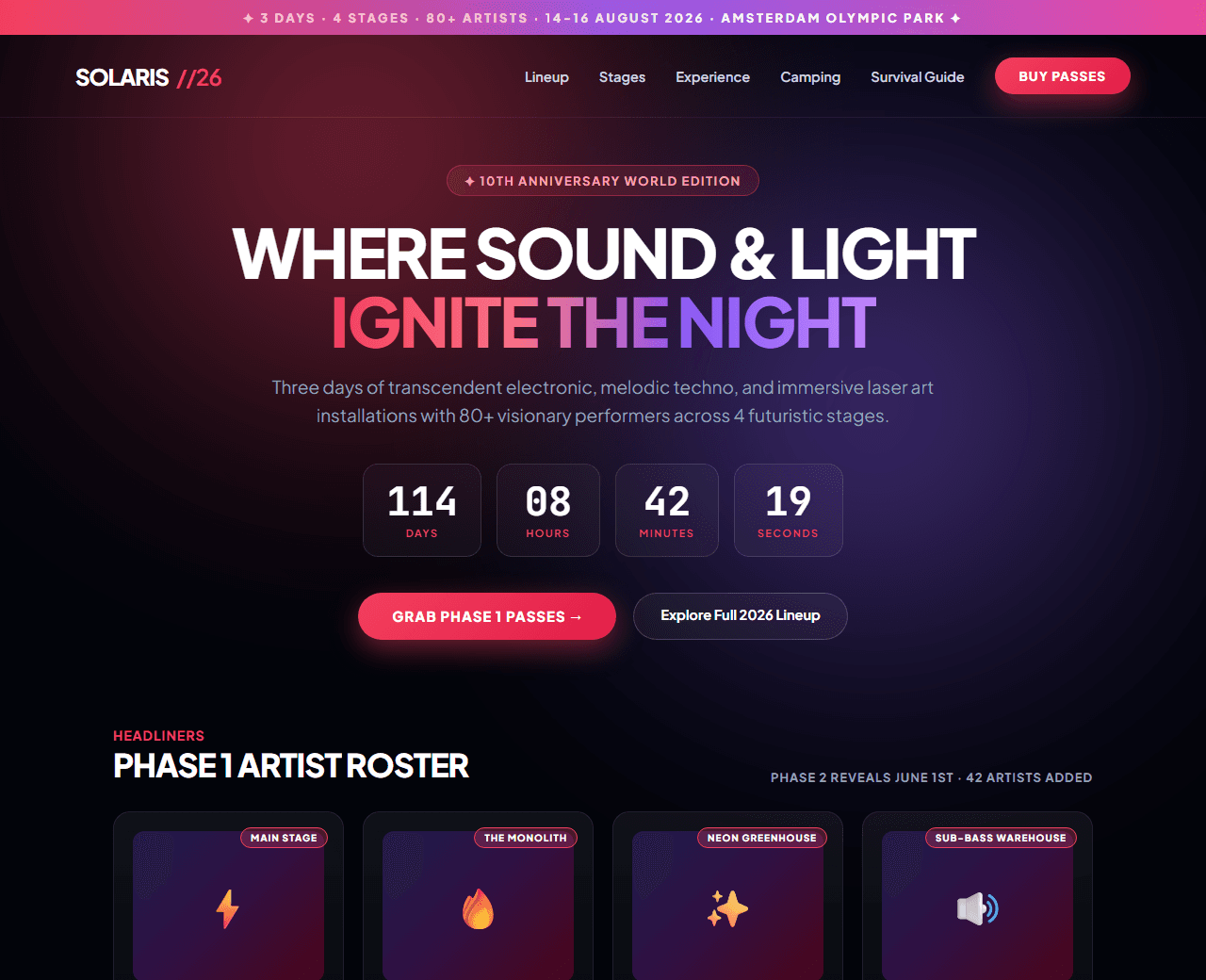
Example of the website this prompt builds. Your result will use your own name, text and images.
- Tech stack
- Next.js (App Router) + Tailwind CSS
- Colour palette
#02040a#ffffff#f43f5e#8b5cf6
- What it builds
- Tour city announcement marquee ribbon
- Navbar with Lineup, Schedule, Stages, and Buy Passes
- Hero with festival crowd photography and live ticket countdown
- Headline artist lineup poster graphic grid
- Multi-stage interactive timeline schedule (Main Stage, Neon Oasis, Underground Tent)
- Festival pass ticket tier cards (General Admission, VIP Lounge, Glamping Camping)
- Official Spotify festival playlist embed
- Festival survival guide (Lockers, Shuttles, Hydration, Allowed items)
- Past year aftermovie teaser card
- Footer with festival safety guidelines and transit map
The prompt
Copy everything in the box. Text in quotes and the sample business details are meant to be replaced with your own.
Build an electrifying, sensory music festival and live tour landing page called "Solaris Electronic Music Festival 2026".

Tech stack: Next.js (App Router) with Tailwind CSS.

Visual style: festival midnight aesthetic (#02040a background). Neon laser rose (#f43f5e) and ultraviolet (#8b5cf6) accents. Bold poster-style typography, high-energy festival imagery, and glowing glassmorphic ticket cards.

Sections, in order:
1. Top Marquee Ribbon: "✦ 3 DAYS · 4 STAGES · 80+ ARTISTS · 14-16 AUGUST 2026 · AMSTERDAM OLYMPIC PARK ✦".
2. Navbar: futuristic festival glyph logo, links ("Lineup", "Stages", "Experience", "Camping", "Tickets"), and "Buy Passes" pink button.
3. Hero: centered layout.
   - Badge: "✦ 10th Anniversary World Edition".
   - Headline: "Where sound and light ignite the night",
   - Subtitle: "Three days of transcendent electronic, house, and techno music with the world's most visionary visual artists."
   - Countdown Clock: 4 cards showing Days, Hours, Minutes, and Seconds until gates open.
   - Dual CTAs: "Grab Phase 1 Passes →" and "Explore Full Lineup".
4. The Headliners Lineup Poster: 6 headline artist cards with portraits, DJ names (e.g., Tale of Us, Charlotte de Witte, Bicep Live, Amelie Lens), set times, and genre badges.
5. Interactive Stage Schedule: tabbed selector for Stage 1: The Monolith, Stage 2: The Neon Greenhouse, and Stage 3: Sub-Bass Warehouse.
6. Ticket Pass Tiers: 3 pricing cards: 1) General Admission 3-Day ($220 / €195), 2) VIP Backstage Lounge ($450 / €395 with fast-track entry and private viewing deck), 3) All-Inclusive Luxury Glamping Pass ($850 / €750).
7. Festival Spotify Playlist: audio embed teaser featuring official tracks from performing artists.
8. Camping & Lodging: options for BYO Tent, Pre-Pitched Bell Tents, and Partner Hotel Shuttles.
9. Festival Essentials & FAQ: 6 questions about age restrictions (18+), cashless wristbands, and locker rentals.
10. Footer: zero-tolerance drug policy, harm reduction resources, and environmental pledge.

Quality bar:
- Fully responsive: design mobile-first, then tablet (768px) and desktop (1200px).
- Accessible: semantic HTML landmarks, one h1, alt text on images, visible keyboard focus, colour contrast of at least 4.5:1 for body text.
- Fast: no heavy libraries, lazy-load images below the fold, system or two web fonts at most.
- Use placeholder images from a neutral source and realistic sample copy (no lorem ipsum).
- Respect prefers-reduced-motion for every animation.
- Keep the code clean and commented so I can edit it by hand.
How to use this prompt
- 1
Open an AI coding tool. Use any capable assistant: Claude, ChatGPT, Cursor, v0, Bolt, Gemini. Tools that can create files (Cursor, Claude Code, v0, Bolt) are the most convenient because they write the project for you.
- 2
Replace the sample details. Copy the prompt and change the business name, location, colours and any section you do not need. The more specific your details, the better the result.
- 3
Paste the prompt and generate. Send the whole prompt in one message. If the reply is cut off, say “continue from where you stopped”, or ask for one section at a time.
- 4
Run it on your computer. Create a project with “npx create-next-app@latest”, add the generated files, then run “npm run dev” and open http://localhost:3000.
- 5
Review and refine. Check it on a phone-width screen, fix anything that looks off by describing it in plain words, then use the follow-up prompts below to add features one at a time.
- 6
Replace placeholders and publish. Swap in your real text and images, then deploy. Vercel and Netlify both host this kind of site for free.
Follow-up prompts
Send these one at a time after the first version is working. Small, specific requests give much better results than one giant prompt.
Add interactive line-up search and artist filtering by genre.
Add live ticket checkout modal with tier quantity counter.
Add interactive 3D festival grounds map placeholder.
Add MusicFestival and Event Schema.org structured data.
Tips for a better result
- Use bold, impactful display fonts to mimic iconic festival poster typography.
- Keep ticket scarcity clear (e.g. 'Phase 1 passes 85% sold out').
- Want to hand-build a section instead? The Templates library has heroes, pricing tables, FAQs and more with full code.