AI Video Generator & VFX Platform
A state-of-the-art AI video generation and VFX platform landing page featuring interactive prompt playgrounds, video previews, and pricing tiers.
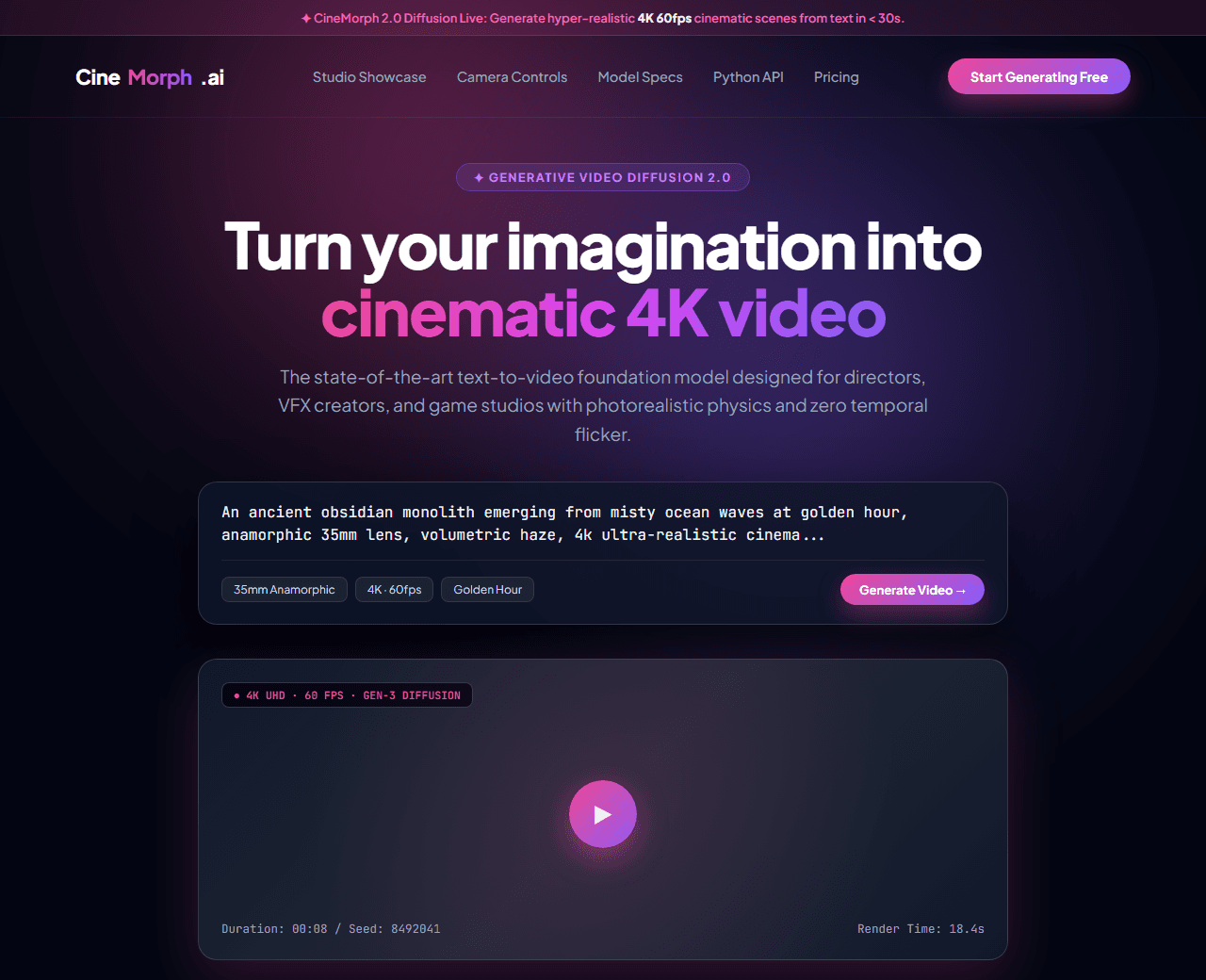
Example of the website this prompt builds. Your result will use your own name, text and images.
- Tech stack
- Next.js (App Router) + Tailwind CSS
- Colour palette
#030712#ffffff#ec4899#8b5cf6
- What it builds
- Top foundation model announcement pill ('Sora v2 & Gen-3 Video Diffusion live')
- Navbar with Web Studio Console and API Docs
- Hero with text-to-video prompt playground generator preview
- Curated AI video showcase gallery with prompt text overlays
- Cinematic camera motion controls (Pan, Orbit, Drone fly-through, Tilt)
- Resolution and frame rate spec badges (4K 60fps, 10-bit HDR)
- Creator and studio subscription pricing plans with compute credits
- Developer API code integration snippet (Python & cURL)
- Testimonials from film directors and creative agencies
- Footer with system GPU cluster status
The prompt
Copy everything in the box. Text in quotes and the sample business details are meant to be replaced with your own.
Build a futuristic, cinematic AI video generation and VFX creative platform landing page called "CineMorph AI: Generative Cinema Studio".

Tech stack: Next.js (App Router) with Tailwind CSS.

Visual style: cinematic obsidian dark mode (#030712). Electric fuchsia (#ec4899) and neon violet (#8b5cf6) gradients. Wide 16:9 and 2.39:1 anamorphic aspect ratio cards, glowing video frames, and ultra-crisp typography.

Sections, in order:
1. Top Strip: "✦ CineMorph 2.0 Released: Generate hyper-realistic 4K 60fps cinematic video from text prompts in 30 seconds."
2. Navbar: prism film reel logo, links ("Showcase", "Features", "Camera Controls", "API", "Pricing"), and "Start Generating Free" gradient button.
3. Hero: centered layout.
   - Headline: "Turn your imagination into cinematic video",
   - Subtitle: "The world's most advanced diffusion model for filmmakers, animators, and game studios with photorealistic physics and coherent temporal consistency."
   - Interactive Generator Box: prompt input field with sample text: 'An ancient obsidian temple emerging from stormy ocean waves at golden hour, anamorphic 35mm lens, 4k cinematic', with 'Generate Video' button and model style selector.
   - Video Result Card: simulated video player showing generated scene with play button, duration (00:08), and resolution badge (4K UHD).
4. Camera Motion Control Matrix: 4 cards showing visual icons for camera maneuvers: 1) Drone Fly-Through, 2) 360-Degree Orbit, 3) Handheld Dolly Zoom, 4) FPV High-Speed Tracking.
5. Community Video Showcase: 4 video cards featuring diverse genres (Sci-Fi Cyberpunk, Nature Documentary, Cyber Fantasy, Commercial Fashion) with the exact text prompt displayed on hover.
6. Technical Video Specs: 4 stats: "4K 60fps Native Output", "Zero Temporal Flickering", "10-Bit Color Depth", "Sub-60s Render Speed".
7. Creator Pricing: 3 tiers: 1) Hobbyist ($15/mo with 200 compute minutes), 2) Pro Filmmaker ($49/mo with unlimited 1080p and commercial rights), 3) Studio Team ($149/mo with 4K rendering and API access).
8. Film Industry Quotes: reviews from creative directors at VFX studios and YouTube creators.
9. Final Call to Action: full-width dark banner inviting creators to generate their first 5 videos free.
10. Footer: copyright, content safety guidelines, copyright IP defense pledge, and GPU cluster status.

Quality bar:
- Fully responsive: design mobile-first, then tablet (768px) and desktop (1200px).
- Accessible: semantic HTML landmarks, one h1, alt text on images, visible keyboard focus, colour contrast of at least 4.5:1 for body text.
- Fast: no heavy libraries, lazy-load images below the fold, system or two web fonts at most.
- Use placeholder images from a neutral source and realistic sample copy (no lorem ipsum).
- Respect prefers-reduced-motion for every animation.
- Keep the code clean and commented so I can edit it by hand.
How to use this prompt
- 1
Open an AI coding tool. Use any capable assistant: Claude, ChatGPT, Cursor, v0, Bolt, Gemini. Tools that can create files (Cursor, Claude Code, v0, Bolt) are the most convenient because they write the project for you.
- 2
Replace the sample details. Copy the prompt and change the business name, location, colours and any section you do not need. The more specific your details, the better the result.
- 3
Paste the prompt and generate. Send the whole prompt in one message. If the reply is cut off, say “continue from where you stopped”, or ask for one section at a time.
- 4
Run it on your computer. Create a project with “npx create-next-app@latest”, add the generated files, then run “npm run dev” and open http://localhost:3000.
- 5
Review and refine. Check it on a phone-width screen, fix anything that looks off by describing it in plain words, then use the follow-up prompts below to add features one at a time.
- 6
Replace placeholders and publish. Swap in your real text and images, then deploy. Vercel and Netlify both host this kind of site for free.
Follow-up prompts
Send these one at a time after the first version is working. Small, specific requests give much better results than one giant prompt.
Add interactive camera direction controls (pan, tilt, zoom sliders).
Add interactive video generation progress simulation with percentage counter.
Add video download format selector (MP4, ProRes 422, GIF).
Add SoftwareApplication and VideoObject JSON-LD schema.
Tips for a better result
- Use film and cinematography terms (anamorphic, 35mm, golden hour, temporal consistency) to appeal to professionals.
- Display the prompt alongside video previews to demonstrate output capabilities.
- Want to hand-build a section instead? The Templates library has heroes, pricing tables, FAQs and more with full code.