Mobile App Waitlist & Viral Launch
A high-converting pre-launch waitlist page for mobile applications with viral referral gamification, live queue counter, and phone mockups.
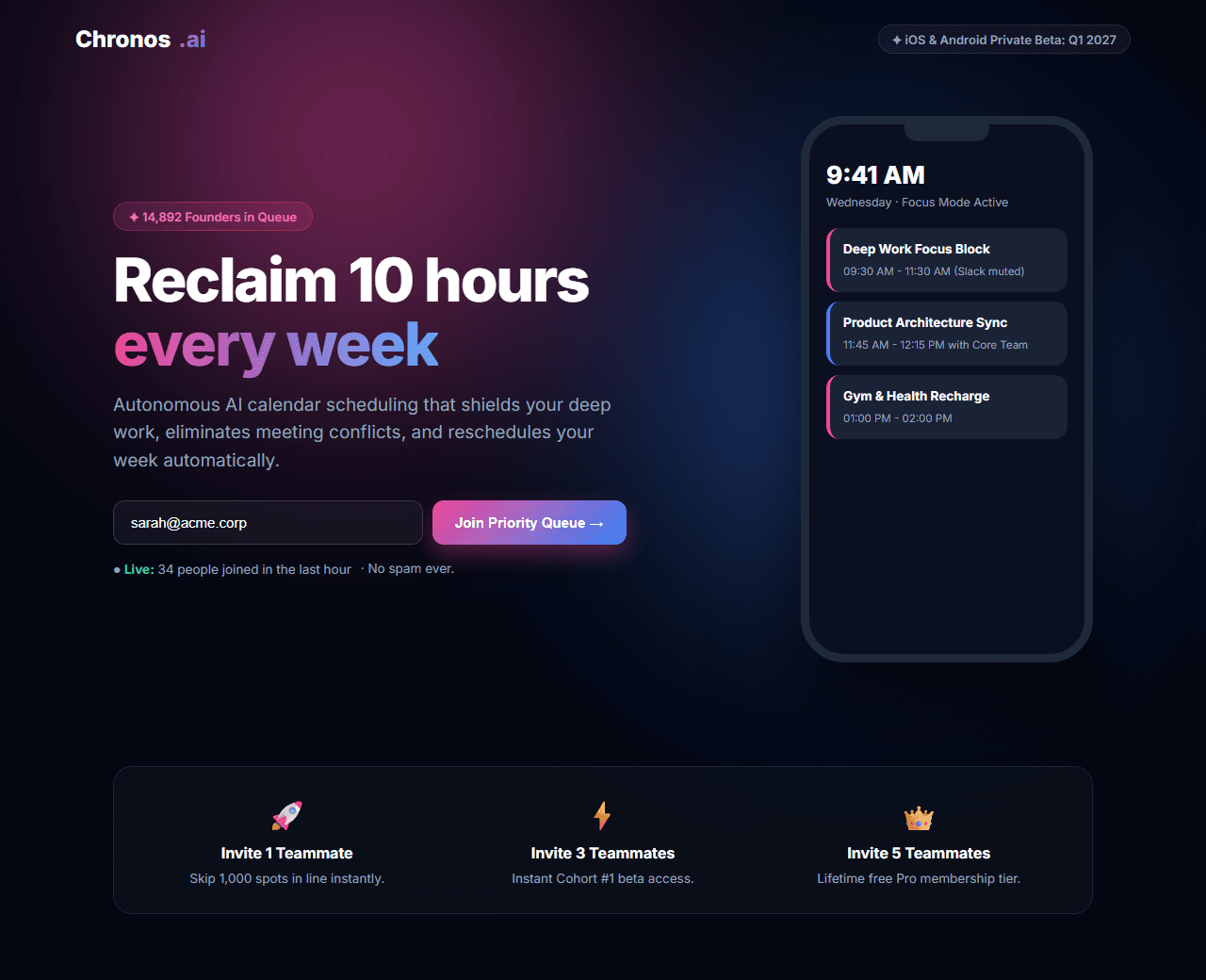
Example of the website this prompt builds. Your result will use your own name, text and images.
- Tech stack
- Next.js (App Router) + Tailwind CSS
- Colour palette
#030712#ffffff#ec4899#3b82f6
- What it builds
- Minimalist brand bar with early access badge
- Hero with 3D smartphone mockup and email waitlist form
- Live waitlist counter ('14,892 people in queue')
- Viral referral queue mechanism ('Invite 3 friends to skip 5,000 spots')
- Three core screenshot previews of app features
- Early adopter perks (Free lifetime Pro tier, limited founder badge)
- Indie creator & investor backers bar
- Footer with privacy policy and social handles
The prompt
Copy everything in the box. Text in quotes and the sample business details are meant to be replaced with your own.
Build a viral, high-conversion pre-launch waitlist landing page for an upcoming mobile app called "Chronos: The AI Time Optimizer".

Tech stack: Next.js (App Router) with Tailwind CSS.

Visual style: ultra-clean modern dark mode (#030712). Vibrant magenta (#ec4899) and electric blue (#3b82f6) gradients. Glassmorphic pill inputs, smooth animated borders, and smartphone frame mockup with realistic notch and shadows.

Sections, in order:
1. Header: clean logo with clock symbol, "Coming Spring 2027 to iOS & Android", and Twitter/X community link.
2. Hero: split layout.
   - Left side: badge "✦ Private Beta Opening Soon", headline "Reclaim 10 hours of your week with autonomous scheduling", paragraph explaining how Chronos blocks distraction and reschedules conflicting meetings automatically.
   - Email Signup Form: input with email placeholder, "Join Waitlist →" gradient button, and reassurance text "No spam. Unsubscribe anytime."
   - Live Counter: "14,892 founders and creators in line. Beta cohort #1 launches in 18 days."
   - Right side: sleek iPhone mockup displaying the Chronos daily timeline interface with colorful event blocks and intelligent suggestions.
3. Viral Referral Queue Gamification: interactive preview showing how users who share their custom referral link move up the waitlist: "Invite 1 friend = Skip 1,000 spots", "Invite 3 friends = Instant Beta Access", "Invite 5 friends = Free Lifetime Pro".
4. Three Core Pillars: 3 feature cards with micro-illustrations: "Zero-Click Calendar Sync", "Context-Aware Focus Modes", and "Daily Productivity Scorecard".
5. Founder Exclusive Perks: cards detailing rewards for the first 1,000 beta members (Special badge, direct access to founders Slack, locked-in lifetime discount).
6. Backed By: logos of notable angel investors and creator studios.
7. Minimal Footer: links to privacy policy, terms, and social links.

Quality bar:
- Fully responsive: design mobile-first, then tablet (768px) and desktop (1200px).
- Accessible: semantic HTML landmarks, one h1, alt text on images, visible keyboard focus, colour contrast of at least 4.5:1 for body text.
- Fast: no heavy libraries, lazy-load images below the fold, system or two web fonts at most.
- Use placeholder images from a neutral source and realistic sample copy (no lorem ipsum).
- Respect prefers-reduced-motion for every animation.
- Keep the code clean and commented so I can edit it by hand.
How to use this prompt
- 1
Open an AI coding tool. Use any capable assistant: Claude, ChatGPT, Cursor, v0, Bolt, Gemini. Tools that can create files (Cursor, Claude Code, v0, Bolt) are the most convenient because they write the project for you.
- 2
Replace the sample details. Copy the prompt and change the business name, location, colours and any section you do not need. The more specific your details, the better the result.
- 3
Paste the prompt and generate. Send the whole prompt in one message. If the reply is cut off, say “continue from where you stopped”, or ask for one section at a time.
- 4
Run it on your computer. Create a project with “npx create-next-app@latest”, add the generated files, then run “npm run dev” and open http://localhost:3000.
- 5
Review and refine. Check it on a phone-width screen, fix anything that looks off by describing it in plain words, then use the follow-up prompts below to add features one at a time.
- 6
Replace placeholders and publish. Swap in your real text and images, then deploy. Vercel and Netlify both host this kind of site for free.
Follow-up prompts
Send these one at a time after the first version is working. Small, specific requests give much better results than one giant prompt.
Add interactive waitlist submission state with animated confetti and custom shareable referral link generator.
Add a live countdown timer ticking down to the public beta launch date.
Connect email submission to Supabase or Firebase waitlist table.
Generate OpenGraph social card showing the user's specific waitlist rank.
Tips for a better result
- Include clear social share buttons (X, LinkedIn, WhatsApp) directly upon email submission.
- Keep the hero form above the fold on mobile viewports for maximum conversion rate.
- Want to hand-build a section instead? The Templates library has heroes, pricing tables, FAQs and more with full code.