B2B Freight & Logistics Tracking
An enterprise supply chain and container tracking platform with live shipment tracking inputs, rate calculators, and route visualizers.
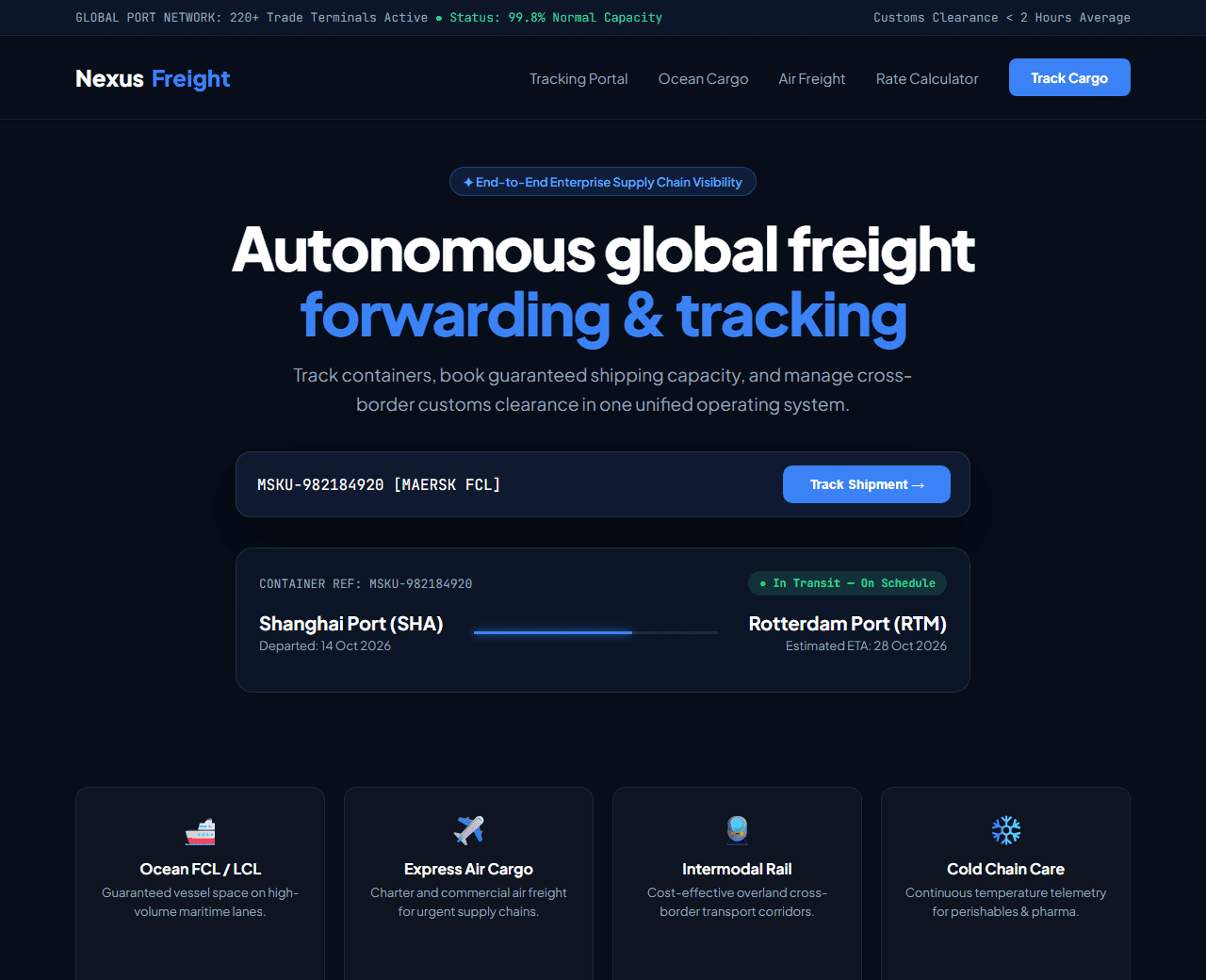
Example of the website this prompt builds. Your result will use your own name, text and images.
- Tech stack
- Next.js (App Router) + Tailwind CSS
- Colour palette
#070d19#ffffff#3b82f6#f59e0b
- What it builds
- Global supply chain live network status ticker
- Navbar with Track Shipment portal and Request Quote button
- Hero with universal container and AWB tracking search bar
- Live global freight route map visualizer
- Multimodal freight capabilities (Ocean, Air Cargo, Intermodal Rail, Cross-Border Trucking)
- Instant freight quote rate estimation calculator
- Enterprise fleet scale metrics & carbon offset monitoring
- Customs brokerage and international trade compliance certifications
- Enterprise case study metrics (99.8% on-time delivery rate)
- Schedule Enterprise Logistics Demo form and comprehensive footer
The prompt
Copy everything in the box. Text in quotes and the sample business details are meant to be replaced with your own.
Build a high-performance B2B logistics, ocean freight, and cargo tracking platform called "NexusFreight Global Supply Chain OS".

Tech stack: Next.js (App Router) with Tailwind CSS.

Visual style: commanding industrial dark mode (#070d19). Deep ocean blue (#3b82f6) and safety amber (#f59e0b) accents. Clean tabular data displays, high-contrast monospace tracking numbers, and interactive shipping status badges.

Sections, in order:
1. Top Bar: "Real-time global trade update: Ports operating at 99.4% capacity. Carbon-neutral shipping available across all routes."
2. Navbar: bold industrial logo, links ("Tracking", "Freight Solutions", "Rate Calculator", "Customs & Trade", "About"), and "Track Cargo" button.
3. Hero: centered layout.
   - Headline: "Autonomous global freight forwarding & real-time tracking".
   - Subtitle: "Connect your supply chain with end-to-end visibility across 220+ ports. Book, track, and clear customs in one unified enterprise portal."
   - Universal Tracking Search Card: high-contrast input box "Enter Container #, Bill of Lading (B/L) or Air Waybill (AWB)", with "Track Shipment →" button and quick example tags (e.g. MSKU9281924, 023-8472910).
   - Live Tracking Card Simulation: displays container route (Shanghai Port → Rotterdam), current status "In Transit - Red Sea Corridor", estimated ETA (28 Oct 2026), vessel name, and GPS coordinates.
4. Multimodal Transport Options: 4 capability cards: 1) Full Container Load (FCL) Ocean Freight, 2) Expedited Air Cargo with guaranteed capacity, 3) Intermodal Rail Logistics, 4) Temperature-Controlled Cold Chain.
5. Instant Freight Rate Estimator: interactive calculator where users pick Origin Port, Destination Port, Container Size (20ft vs 40ft), Cargo Weight, and view estimated transit days and price.
6. Enterprise Scale Metrics: 4 stats: "$14B+ Cargo Handled Annually", "2,400+ Global Trade Lanes", "99.8% On-Time Delivery", "< 2hr Customs Clearance".
7. Enterprise Integrations: ERP and warehouse integration logos (SAP, Oracle, NetSuite, Shopify, Flexport).
8. Customer Case Studies: quotes from Supply Chain Directors at major manufacturers and retail brands.
9. Request Enterprise Rate Consultation: form for booking customized high-volume freight agreements.
10. Footer: port directory, customs regulations library, bill of lading terms, and international office locations.

Quality bar:
- Fully responsive: design mobile-first, then tablet (768px) and desktop (1200px).
- Accessible: semantic HTML landmarks, one h1, alt text on images, visible keyboard focus, colour contrast of at least 4.5:1 for body text.
- Fast: no heavy libraries, lazy-load images below the fold, system or two web fonts at most.
- Use placeholder images from a neutral source and realistic sample copy (no lorem ipsum).
- Respect prefers-reduced-motion for every animation.
- Keep the code clean and commented so I can edit it by hand.
How to use this prompt
- 1
Open an AI coding tool. Use any capable assistant: Claude, ChatGPT, Cursor, v0, Bolt, Gemini. Tools that can create files (Cursor, Claude Code, v0, Bolt) are the most convenient because they write the project for you.
- 2
Replace the sample details. Copy the prompt and change the business name, location, colours and any section you do not need. The more specific your details, the better the result.
- 3
Paste the prompt and generate. Send the whole prompt in one message. If the reply is cut off, say “continue from where you stopped”, or ask for one section at a time.
- 4
Run it on your computer. Create a project with “npx create-next-app@latest”, add the generated files, then run “npm run dev” and open http://localhost:3000.
- 5
Review and refine. Check it on a phone-width screen, fix anything that looks off by describing it in plain words, then use the follow-up prompts below to add features one at a time.
- 6
Replace placeholders and publish. Swap in your real text and images, then deploy. Vercel and Netlify both host this kind of site for free.
Follow-up prompts
Send these one at a time after the first version is working. Small, specific requests give much better results than one giant prompt.
Add interactive shipment status step visualizer (Booked -> In Transit -> Customs -> Delivered).
Add carbon footprint CO2 emissions calculation per shipping route.
Add simulated webhook payload preview for logistics API integration.
Add Schema.org Organization and LogisticsService structured data.
Tips for a better result
- Use realistic container codes and shipping terminology (TEU, FCL, LCL, demurrage, incoterms).
- Ensure tracking inputs accept paste events and provide clear instant loading states.
- Want to hand-build a section instead? The Templates library has heroes, pricing tables, FAQs and more with full code.