Non-Profit & Environmental Charity
A transparent, impactful non-profit conservation foundation website with interactive donation builders, live campaign trackers, and audit reports.
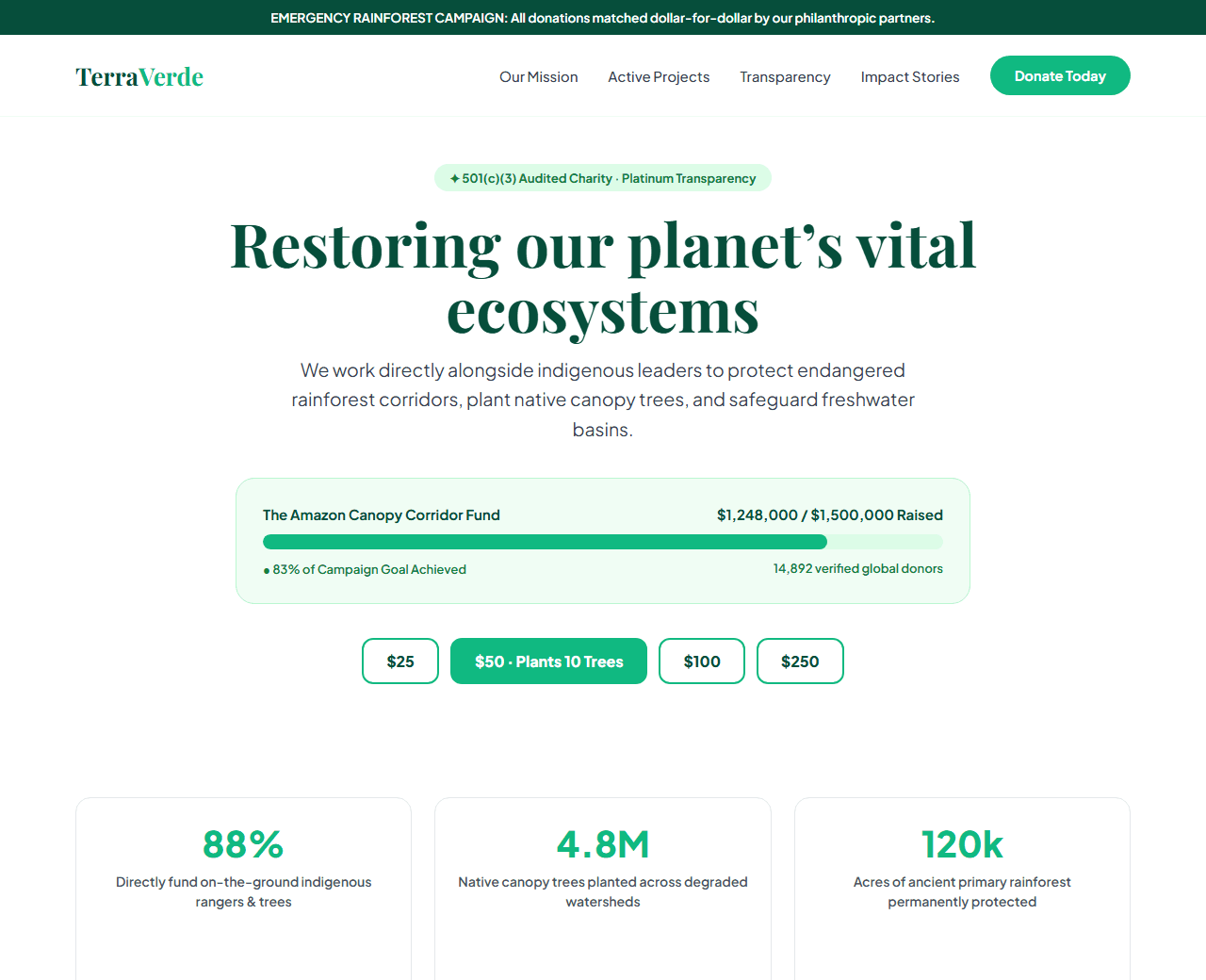
Example of the website this prompt builds. Your result will use your own name, text and images.
- Tech stack
- Next.js (App Router) + Tailwind CSS
- Colour palette
#ffffff#064e3b#10b981#d97706
- What it builds
- Urgent conservation campaign announcement bar
- Navbar with Impact Reports and Donate Now button
- Hero with emotional field photography & transparent mission statement
- Live fundraising campaign progress bar ($1.24M / $1.5M raised)
- Interactive donation amount selector (One-time vs Monthly recurring)
- Where your donation goes transparency breakdown (88% directly to field)
- Field conservation stories with photo journalism
- Verified tax-exempt charity seals and annual audited reports
- Corporate matching gifts and volunteer sign-up cards
- Footer with annual report download and charity registration ID
The prompt
Copy everything in the box. Text in quotes and the sample business details are meant to be replaced with your own.
Build a transparent, inspiring non-profit conservation and humanitarian foundation website called "TerraVerde Global Conservation Initiative".

Tech stack: Next.js (App Router) with Tailwind CSS.

Visual style: natural, credible, and urgent. Pure white background (#ffffff), deep rainforest green (#064e3b), vibrant emerald (#10b981) for progress indicators, and warm gold (#d97706) for donation badges. Powerful photography framing and clean data charts.

Sections, in order:
1. Top Urgent Bar: "Emergency Rainforest Relief: Matching all donations dollar-for-dollar through the end of this month."
2. Navbar: tree leaf emblem logo, links ("Our Mission", "Projects", "Transparency", "Stories", "Get Involved"), and "Donate Now" green button.
3. Hero: centered layout.
   - Headline: "Restoring our planet's vital ecosystems, one acre at a time".
   - Subtitle: "TerraVerde partners with indigenous communities to safeguard critical biodiversity hotspots, plant native canopy trees, and protect endangered wildlife."
4. Live Campaign Meter: card displaying active campaign "The Amazon Canopy Corridor Fund", raising $1,248,000 of $1,500,000 goal (83% completed) with animated progress bar.
5. Interactive Donation Card: toggle between 'One-Time Gift' and 'Monthly Sustainer' (with badge 'Plants 5 trees every month'). Preset amount chips ($25, $50, $100, $250, Custom input), impact description for each tier, and secure payment button.
6. Transparency Breakdown: 3 pie chart statistics: 88% Direct Field Programs, 8% Administration & Oversight, 4% Future Outreach.
7. Key Conservation Milestones: 4 counter cards: "4.8 Million Trees Planted", "120,000 Acres Protected", "18 Indigenous Communities Supported", "98 Endangered Species Monitored".
8. Field Dispatch Stories: 3 photojournalism story cards documenting indigenous rangers, wildlife rescue, and river basin restoration.
9. Verified Governance: Charity Navigator 4-Star Charity Seal, GuideStar Platinum Transparency Seal, and 501(c)(3) tax-exempt status notice.
10. Footer: audited financial statement downloads, donor bill of rights, and newsletter.

Quality bar:
- Fully responsive: design mobile-first, then tablet (768px) and desktop (1200px).
- Accessible: semantic HTML landmarks, one h1, alt text on images, visible keyboard focus, colour contrast of at least 4.5:1 for body text.
- Fast: no heavy libraries, lazy-load images below the fold, system or two web fonts at most.
- Use placeholder images from a neutral source and realistic sample copy (no lorem ipsum).
- Respect prefers-reduced-motion for every animation.
- Keep the code clean and commented so I can edit it by hand.
How to use this prompt
- 1
Open an AI coding tool. Use any capable assistant: Claude, ChatGPT, Cursor, v0, Bolt, Gemini. Tools that can create files (Cursor, Claude Code, v0, Bolt) are the most convenient because they write the project for you.
- 2
Replace the sample details. Copy the prompt and change the business name, location, colours and any section you do not need. The more specific your details, the better the result.
- 3
Paste the prompt and generate. Send the whole prompt in one message. If the reply is cut off, say “continue from where you stopped”, or ask for one section at a time.
- 4
Run it on your computer. Create a project with “npx create-next-app@latest”, add the generated files, then run “npm run dev” and open http://localhost:3000.
- 5
Review and refine. Check it on a phone-width screen, fix anything that looks off by describing it in plain words, then use the follow-up prompts below to add features one at a time.
- 6
Replace placeholders and publish. Swap in your real text and images, then deploy. Vercel and Netlify both host this kind of site for free.
Follow-up prompts
Send these one at a time after the first version is working. Small, specific requests give much better results than one giant prompt.
Add interactive monthly tree planting calculator slider.
Integrate Stripe donation checkout with Apple Pay and Google Pay simulation.
Add corporate gift matching employer search tool.
Add NGO and CharitableOrganization Schema.org structured data.
Tips for a better result
- Lead with financial transparency; donors need to see exactly what percentage goes to the field.
- Use realistic impact statements for each donation amount tier.
- Want to hand-build a section instead? The Templates library has heroes, pricing tables, FAQs and more with full code.