Podcast Show & Audio Network
A media-rich podcast network website featuring an interactive audio player, chapter markers, guest rosters, and multi-platform listening links.
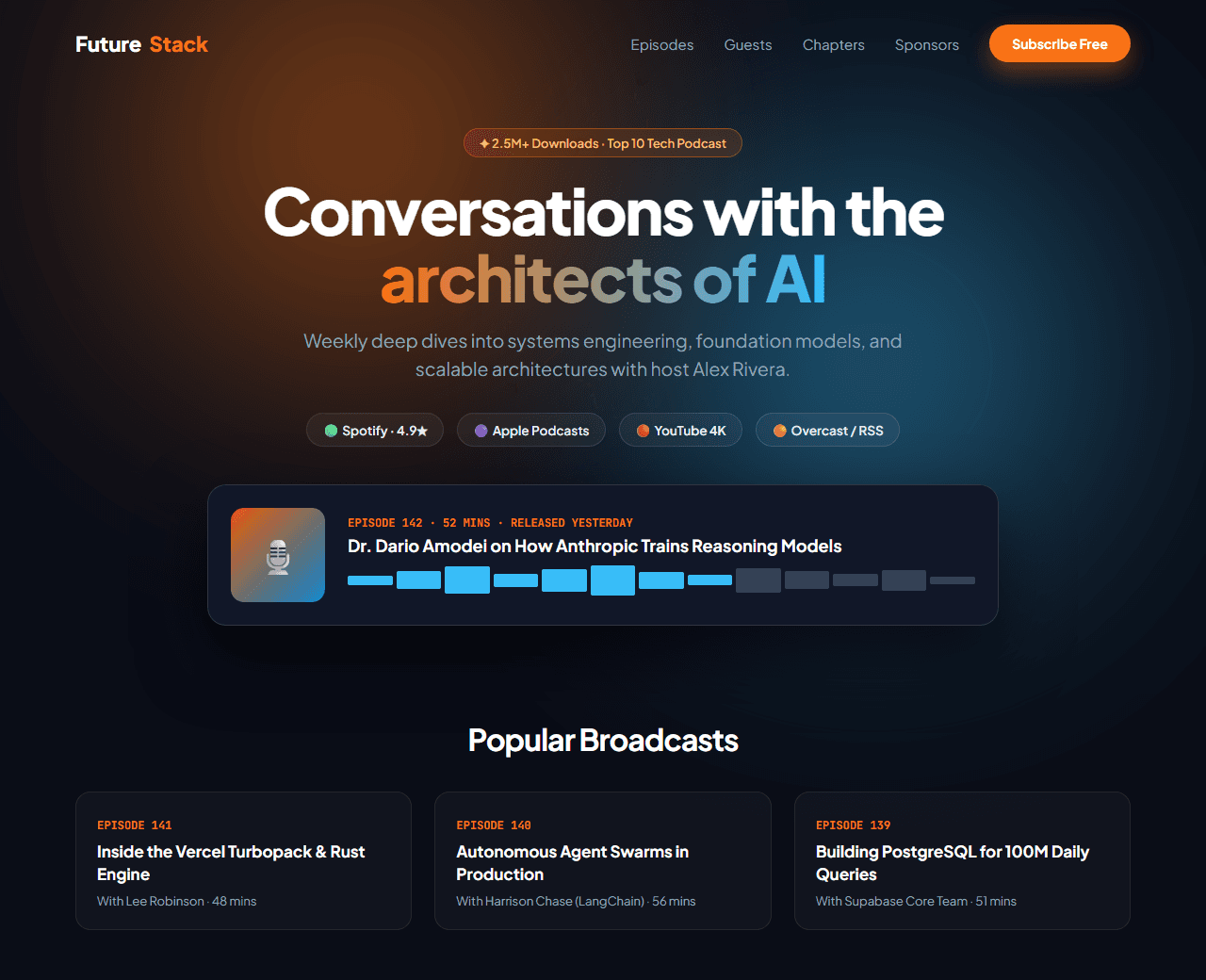
Example of the website this prompt builds. Your result will use your own name, text and images.
- Tech stack
- Next.js (App Router) + Tailwind CSS
- Colour palette
#0a0d17#ffffff#f97316#38bdf8
- What it builds
- Persistent floating episode audio player bar
- Hero with vinyl record artwork, host credentials & show summary
- Platform listener badges (Spotify, Apple Podcasts, YouTube, Overcast)
- Featured episode with interactive audio waveform & chapter timestamps
- Episode catalog filter (Interviews, Deep Dives, Solo Monologues)
- High-profile guest avatar wall with notable company roles
- Sponsor endorsement cards with promo discount codes
- Fan community newsletter signup for unreleased audio cuts
- Footer with RSS feed link and host media kit
The prompt
Copy everything in the box. Text in quotes and the sample business details are meant to be replaced with your own.
Build a dynamic, listener-focused podcast show and creator network website called "The Future Stack Podcast".

Tech stack: Next.js (App Router) with Tailwind CSS.

Visual style: broadcast studio dark mode (#0a0d17). Vibrant microphone orange (#f97316) and electric waveform cyan (#38bdf8). Glassmorphic cards with subtle vinyl grooved borders. High-contrast typography.

Sections, in order:
1. Navbar: logo with soundwave waveform icon, links ("Episodes", "Guests", "Chapters", "Sponsors", "About"), and "Subscribe Free" orange button.
2. Hero: centered layout.
   - Badge: "✦ Over 2.5 Million Downloads · Ranked Top 10 Tech Podcast".
   - Headline: "Unfiltered conversations with the architects of modern computing".
   - Subtitle: "Weekly deep dives into systems architecture, artificial intelligence, and startup engineering with host Alex Rivera."
   - Streaming Badges: Spotify, Apple Podcasts, YouTube Music, and RSS feed icons with listener numbers.
3. Featured Episode Showcase: large card featuring episode artwork, title ("Ep. 142: How Anthropic Trains Reasoning Models"), guest name (Dr. Dario Amodei), 52-minute duration, and interactive waveform scrubber bar with play/pause button.
4. Episode Chapters: 4 timestamp chips: 04:12 - Architectural tradeoffs, 18:30 - Synthetic data pipelines, 34:00 - Agentic autonomy, 48:15 - Audience Q&A.
5. Recent Episodes Grid: 4 episode cards displaying guest photo, title, release date, duration, topic tags, and "Listen Episode" button.
6. Hall of Fame Guests: avatar grid of 12 previous guests from OpenAI, Google DeepMind, Stripe, Vercel, and Figma.
7. Sponsor Perks: 2 sponsor cards with company logos, host testimonial, and 20% discount coupon code.
8. VIP Newsletter: email box for weekly show notes, guest reading lists, and raw unedited audio clips.
9. Footer: media kit download, booking inquiries for guests, and copyright.

Quality bar:
- Fully responsive: design mobile-first, then tablet (768px) and desktop (1200px).
- Accessible: semantic HTML landmarks, one h1, alt text on images, visible keyboard focus, colour contrast of at least 4.5:1 for body text.
- Fast: no heavy libraries, lazy-load images below the fold, system or two web fonts at most.
- Use placeholder images from a neutral source and realistic sample copy (no lorem ipsum).
- Respect prefers-reduced-motion for every animation.
- Keep the code clean and commented so I can edit it by hand.
How to use this prompt
- 1
Open an AI coding tool. Use any capable assistant: Claude, ChatGPT, Cursor, v0, Bolt, Gemini. Tools that can create files (Cursor, Claude Code, v0, Bolt) are the most convenient because they write the project for you.
- 2
Replace the sample details. Copy the prompt and change the business name, location, colours and any section you do not need. The more specific your details, the better the result.
- 3
Paste the prompt and generate. Send the whole prompt in one message. If the reply is cut off, say “continue from where you stopped”, or ask for one section at a time.
- 4
Run it on your computer. Create a project with “npx create-next-app@latest”, add the generated files, then run “npm run dev” and open http://localhost:3000.
- 5
Review and refine. Check it on a phone-width screen, fix anything that looks off by describing it in plain words, then use the follow-up prompts below to add features one at a time.
- 6
Replace placeholders and publish. Swap in your real text and images, then deploy. Vercel and Netlify both host this kind of site for free.
Follow-up prompts
Send these one at a time after the first version is working. Small, specific requests give much better results than one giant prompt.
Add real audio playback using HTML5 Audio element with play/pause and progress scrubbing.
Add interactive search input that filters episodes by guest name or topic.
Add dynamic RSS feed XML generator endpoint using Next.js route handlers.
Add PodcastEpisode and PodcastSeries Schema.org structured data.
Tips for a better result
- Include timestamps and chapter links; listeners love navigating directly to relevant topics.
- Keep streaming platform buttons prominent on mobile.
- Want to hand-build a section instead? The Templates library has heroes, pricing tables, FAQs and more with full code.